


Imagine you are standing near a busy road during rush hour. In just a few seconds, your eyes can notice cars, buses, bikes, people, traffic lights, and maybe even a dog crossing the street.
You do not simply think, “There is a vehicle somewhere in front of me.”
Your brain understands something more useful:
“There is a car here. A bike is beside it. Two people are near the crossing. A bus is coming from the left.”
Now imagine teaching a computer to understand a camera feed in a similar way.
That is the problem object detection tries to solve.
And one of the best-known approaches for doing this quickly is YOLO object detection.
YOLO stands for You Only Look Once. The name describes its core idea surprisingly well: instead of repeatedly examining different parts of an image through a slow multi-stage detection process, YOLO processes the image through one unified neural-network pipeline and produces object predictions. The original YOLO research introduced this unified approach to make object detection much faster.
But speed is only part of the story.
To understand why YOLO became so useful for traffic cameras, security systems, robotics, retail monitoring, and many other computer-vision projects, we first need to understand what the model is actually trying to do.
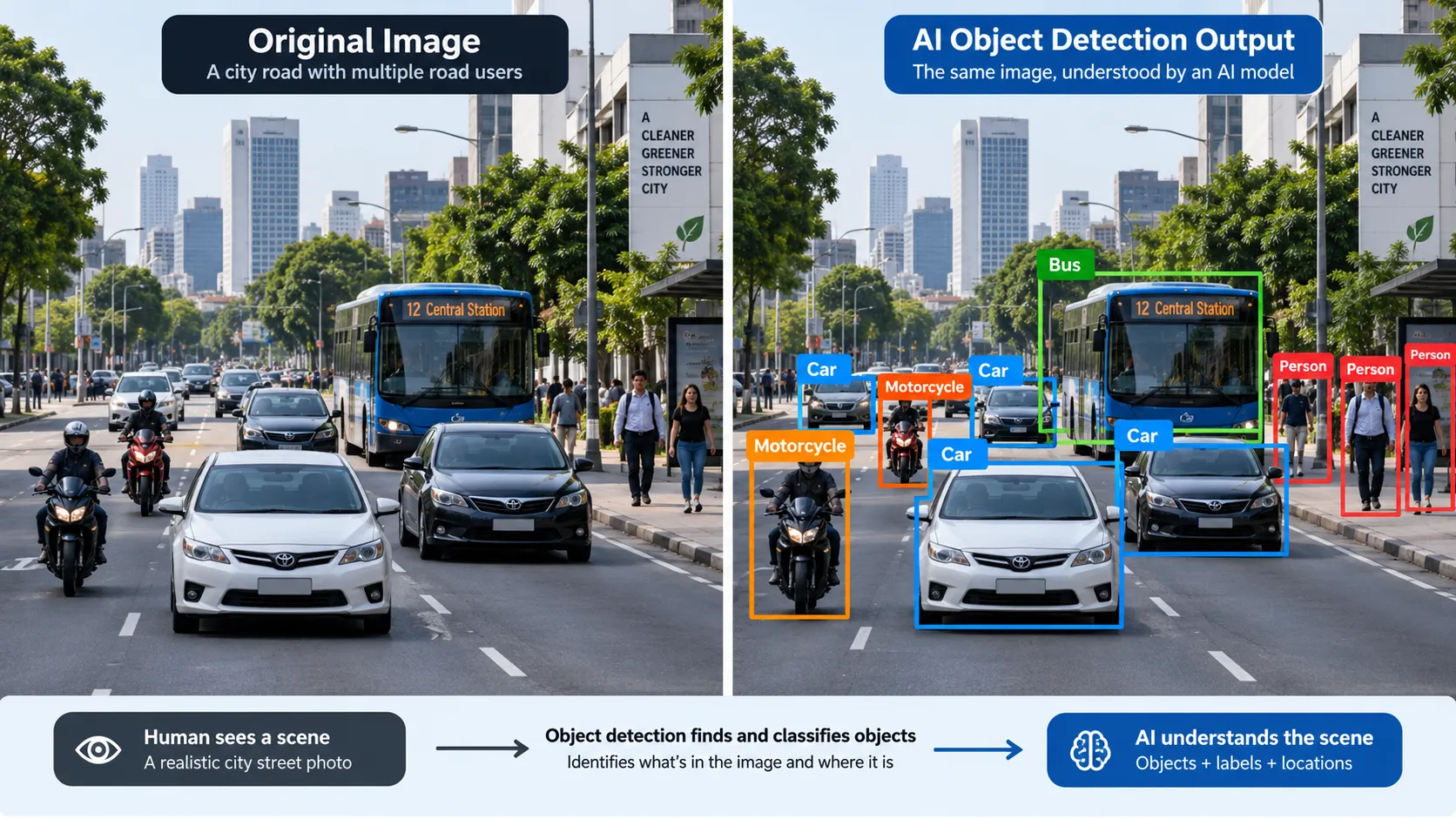
What Is Object Detection?
Object detection is a computer-vision task that answers two important questions:
What objects are present?
and
Where are those objects located?
These two questions make object detection different from normal image classification.
Suppose you give an image of a road to an image-classification model.
It might tell you:
“Car.”
That answer can be correct, but it is not enough for a traffic-monitoring system.
A traffic camera may need to know that there are seven cars, two motorcycles, one bus, and three pedestrians, along with the position of every object.
Object detection adds this location information.
It usually places a rectangular bounding box around each detected object and attaches a class label such as:
Car
Person
Bus
Motorcycle
The model can also provide a confidence score showing how certain it is about a prediction.
That simple combination — object + location + confidence — creates the foundation of a huge number of real-world computer-vision applications.
What Is YOLO?
YOLO is a family of neural-network architectures designed for tasks such as real-time object detection.
Instead of treating detection as many disconnected steps, the original YOLO approach used a single neural network to predict object locations and class probabilities directly from an image.
Think about a CCTV camera watching a parking entrance.
A new frame reaches the detection system.
YOLO examines the frame and may produce predictions such as:
Car — 94% confidence
Person — 89% confidence
Motorcycle — 91% confidence
Each prediction also includes coordinates telling the system where the object appears inside the frame.
So YOLO does not simply say:
“There is a car.”
It effectively says:
“I believe this object is a car, I am highly confident about that prediction, and this is its location in the image.”
That difference is extremely important.
A smart traffic system can use these detections to count vehicles.
A parking system can identify when a vehicle enters a certain region.
A security system can detect people inside a monitored area.
And when object detection is combined with tracking, the system can follow detected objects across multiple video frames.
Modern Ultralytics YOLO tools, for example, support object tracking across video and live streams, which makes the technology useful for applications such as surveillance and vehicle monitoring.
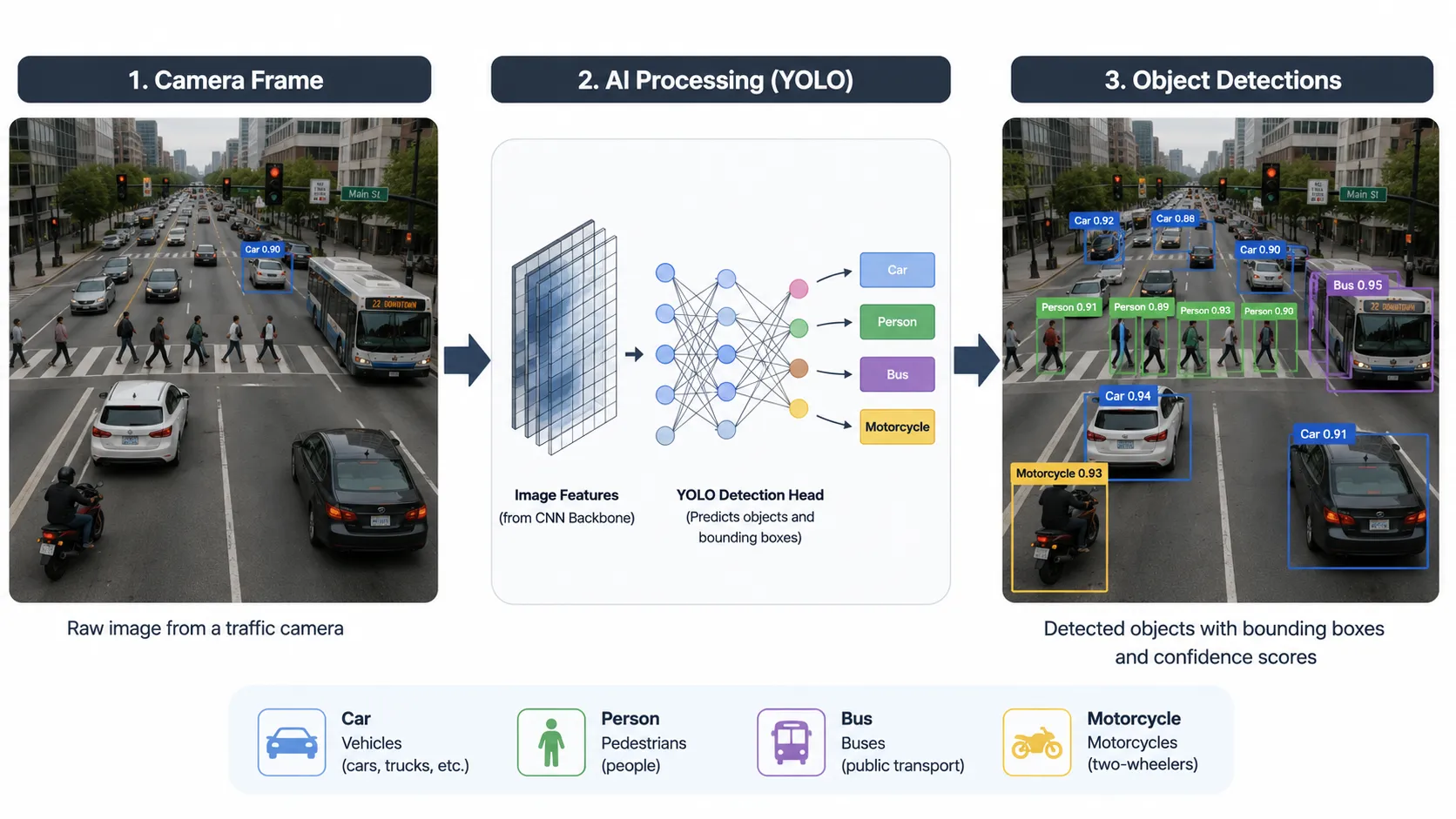
How YOLO Sees a Traffic Camera Frame
Let us connect this with a real situation.
Imagine a camera installed above a busy intersection.
One video frame contains:
a red car near the signal,
a motorcycle moving between two lanes,
a bus farther from the camera,
two pedestrians waiting near the crossing,
and several other vehicles in the background.
To you, these objects are obvious.
To a computer, however, the original frame starts as numerical pixel information.
YOLO has to turn those pixels into useful visual patterns.
Step 1: The Image Enters the Model
The camera frame is prepared in a size and format the model can process.
The model does not understand the words “car” or “person” simply by looking at raw pixels.
It has learned visual patterns during training.
Step 2: YOLO Extracts Useful Features
Different parts of the network learn to respond to useful visual information.
Early processing may capture simpler patterns such as edges, lines, corners, and textures.
Deeper processing can combine those patterns into more meaningful features related to shapes and objects.
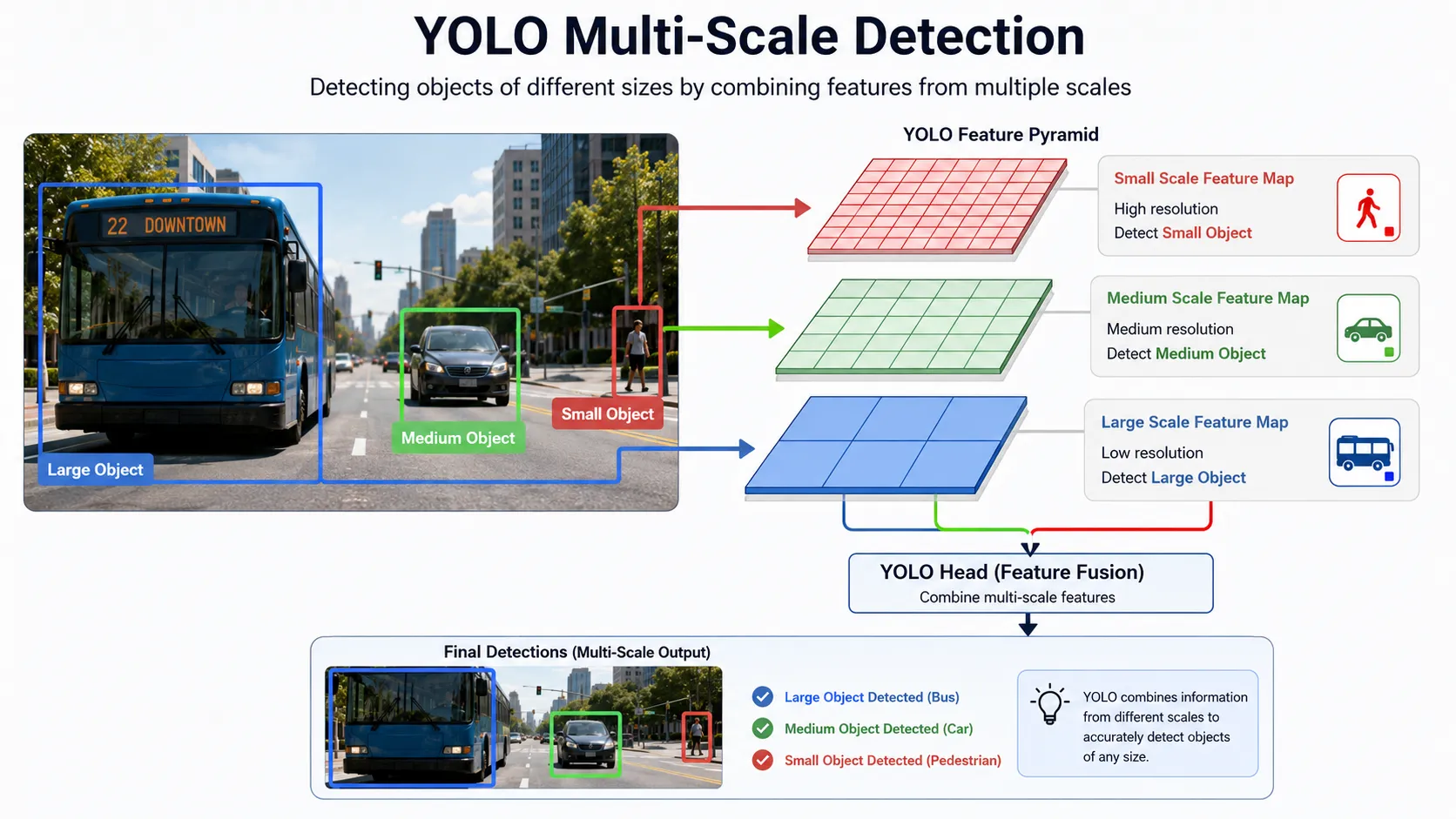
This feature-extraction stage is essential because a motorcycle seen from far away may occupy only a small part of the frame, while a nearby bus may cover a huge area.
Modern YOLO architectures therefore work with information at different scales so that the model can handle objects of different sizes. Current Ultralytics architecture documentation describes the core pipeline using a backbone, a neck, and a detection head.
We will break those three components down properly later instead of treating them as confusing technical terms.
What Does YOLO Actually Predict?
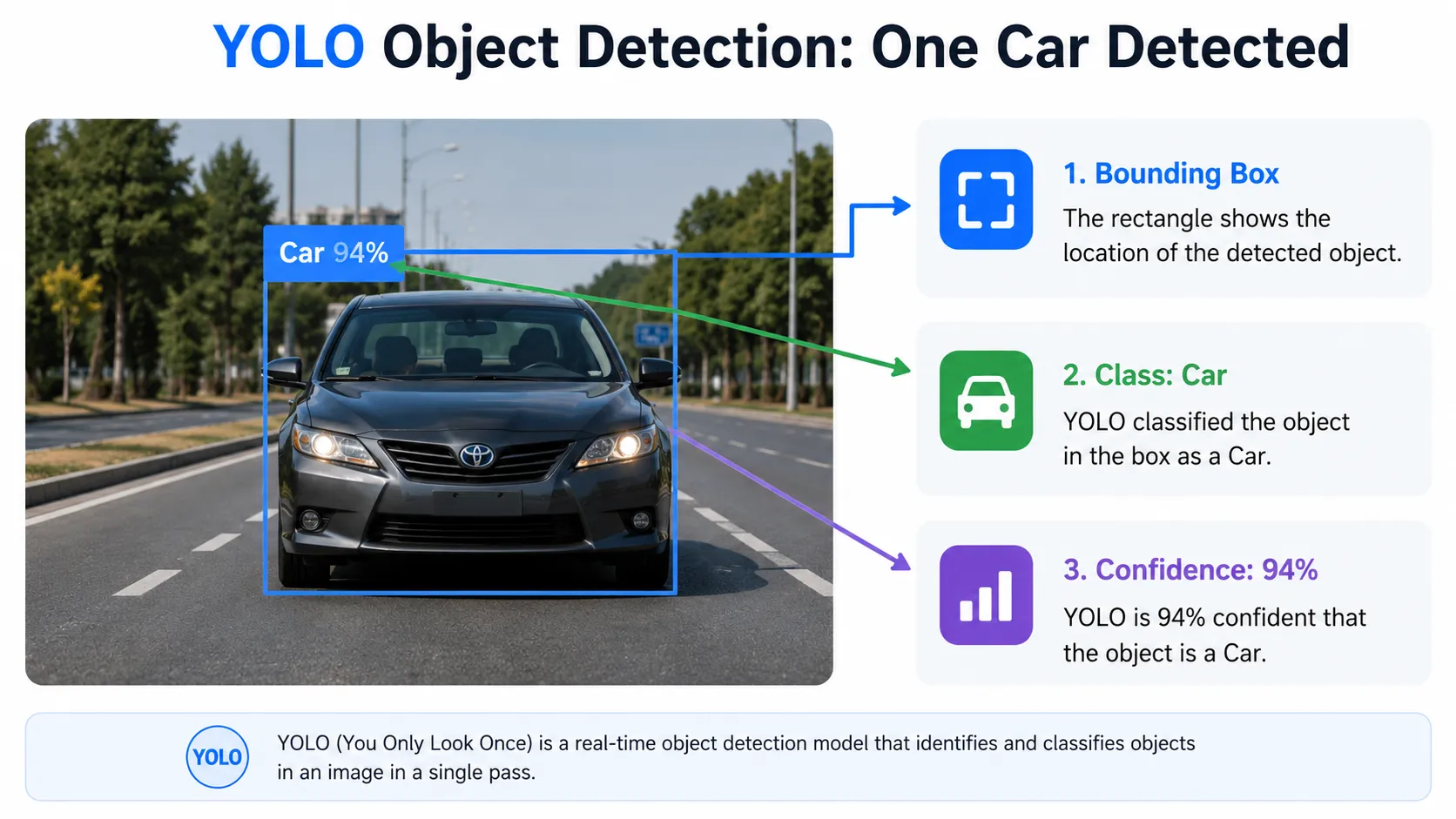
When YOLO recognizes an object, three ideas matter most for a beginner:
1. Bounding Box
The bounding box tells us where the object is.
If YOLO finds a car, the box should surround that car as closely as possible.
2. Class
The class tells us what the object is.
Examples include car, person, bus, bicycle, truck, or dog, depending on the classes the model was trained to recognize.
3. Confidence
The confidence score helps describe how strongly the model supports a detection.
A prediction with strong confidence may be useful, while very weak predictions can often be filtered depending on the application's requirements.
Why YOLO Fits Real-Time Traffic and Security Systems
Now the reason for YOLO's popularity becomes easier to understand.
A recorded photograph can be processed later.
A live traffic camera cannot always wait.
New video frames keep arriving.
If a road-monitoring system needs to detect vehicles, count traffic, estimate movement, or follow objects, it needs a detector that can operate efficiently enough for the application.
The original YOLO paper specifically focused on real-time detection, and modern YOLO systems continue to be used for applications built around live video.
The same principle applies to security cameras.
Imagine a warehouse that should be empty after midnight.
A normal CCTV system records whatever happens.
An intelligent detection system can go further.
It can analyze the video, detect a person entering the monitored area, mark the person on the frame, and connect that detection to an alert workflow. Current YOLO tooling even includes security-alarm examples built around real-time detection and automated alerts.
That is the real value of object detection.
The camera provides the eyes.
YOLO gives the software a way to understand what those eyes are seeing.
But one big question remains:
How can a neural network find several different objects in a single image so quickly?
To answer that, we need to open the YOLO architecture itself and follow the image through the backbone, neck, and detection head.
Inside the YOLO Architecture: Backbone, Neck, and Detection Head
At first, YOLO can feel almost magical.
An image enters the model, and a moment later boxes appear around cars, people, buses, bicycles, and other objects.
But there is no magic happening inside the network.
The model is moving through a carefully designed detection pipeline.
A simple way to understand a modern YOLO architecture is to divide it into three major stages:
Backbone → Neck → Detection Head
Each stage has a different job.
Think about a traffic control room.
One person watches camera feeds and notices useful details.
Another combines information from different cameras and viewpoints.
A final person makes the decision:
“Vehicle here. Pedestrian there. Bus approaching.”
YOLO follows a somewhat similar flow.
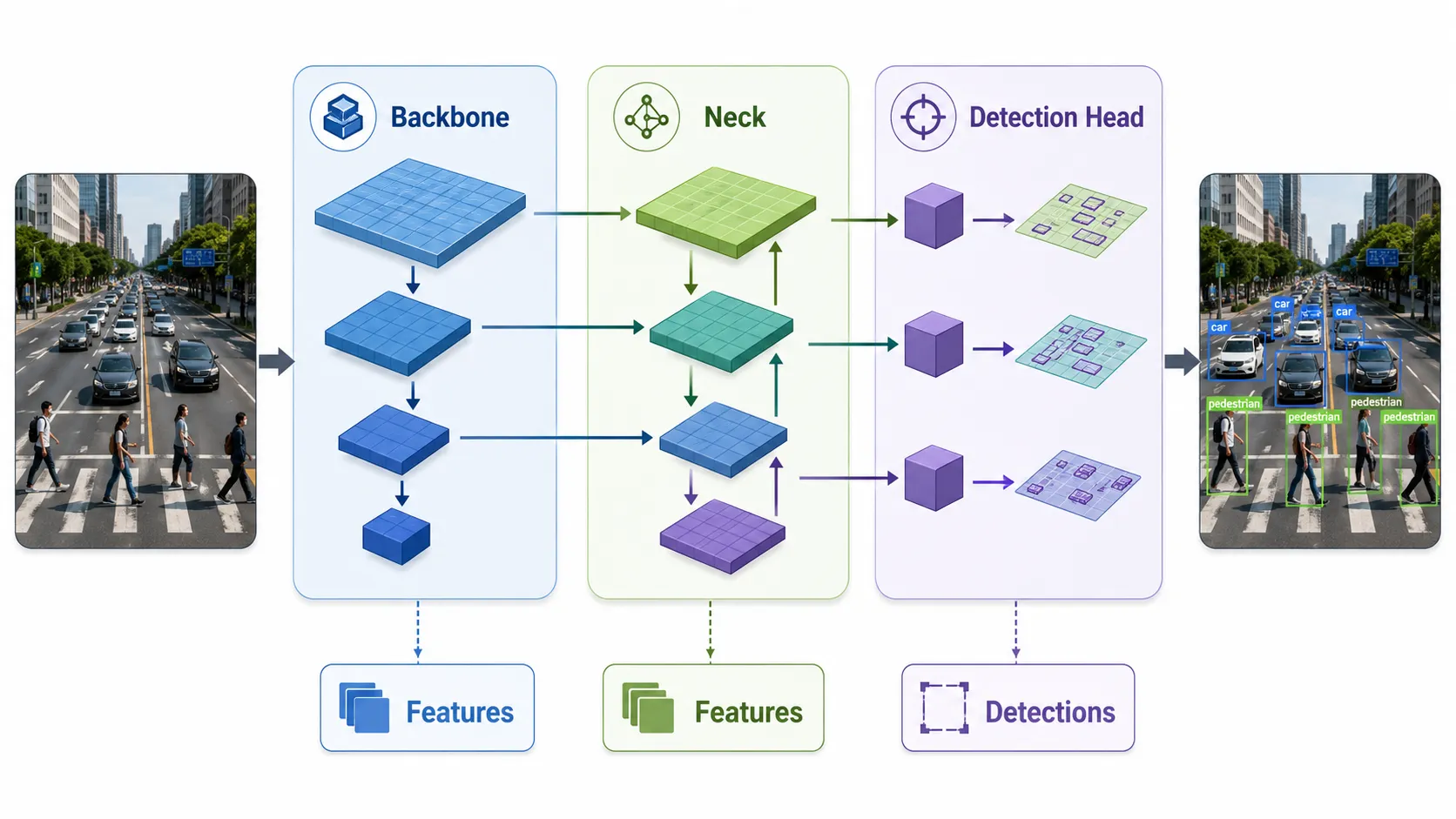
The Backbone: Finding Important Visual Features
The backbone is the feature extractor of the model.
Its job is not yet to decide that a particular area contains a car or a person.
Instead, it converts the original image into useful visual information called feature maps.
Suppose a traffic-camera image enters YOLO.
At the beginning, the model sees pixel values.
As those pixels move deeper through the backbone, the network begins extracting patterns.
Early layers can respond to simple features such as:
edges,
lines,
corners,
basic textures,
and color changes.
Deeper layers combine these simpler patterns into more meaningful visual information.
For example, the model may learn patterns related to wheels, windows, human shapes, vehicle outlines, or other object features.
This is why feature extraction matters.
A car is not identified because YOLO searches for a stored photograph of a car.
It has learned visual patterns from training data and uses those learned features to understand new images.
Modern YOLO versions use different internal backbone designs, so the exact layers can change from one version to another. The important beginner-level idea stays the same:
the backbone turns raw image pixels into useful features that the rest of the detector can understand.
The Neck: Combining Features at Different Scales
Now imagine this traffic scene:
A large bus is close to the camera.
A car is in the middle of the road.
A pedestrian is far away near a crossing.
All three objects have very different sizes inside the image.
If YOLO relied on only one level of visual information, detecting objects at different scales would become harder.
That is where the neck becomes important.
The neck takes feature information from different stages of the network and combines it so the detector can work with both fine details and higher-level visual patterns.
In simple words:
the backbone finds features; the neck helps organize and combine them.
This multi-scale processing is especially useful in traffic monitoring.
A nearby truck may occupy a huge portion of the frame, while a motorcycle far down the road may appear very small.
The detector needs information that helps with both situations.
Modern YOLO architectures therefore make predictions using features at multiple scales, although the exact implementation depends on the YOLO version being used.
The Detection Head: Turning Features Into Answers
After the useful features have been extracted and combined, they reach the detection head.
This is where the model turns visual information into actual predictions.
The detection head is responsible for producing information needed to identify and locate objects.
For a detected car, the final result needs to answer questions such as:
Where is the car?
Which class does it belong to?
How strong is the prediction?
Current YOLO detection heads can predict bounding-box information and class probabilities from processed feature maps. The precise design differs across generations of YOLO.
So if the model finds three cars and one person in a frame, the detection system can produce separate predictions for those objects.
That is how feature maps eventually become the boxes and labels you see on a processed image.
Does YOLO Divide an Image Into a Grid?
This is one of the most common explanations you will find online:
“YOLO divides the image into a grid, and each grid cell predicts objects.”
That explanation comes from the original YOLO architecture, and historically it is important.
The original YOLO model divided an image into an S × S grid. A grid cell was responsible for detecting an object when the center of that object fell inside the cell. The network then predicted bounding boxes, confidence values, and class probabilities.
However, you should not assume that every modern YOLO version still works internally in exactly the same way.
The YOLO family has changed significantly.
Later models introduced different feature pyramids, detection heads, anchor strategies, loss functions, and training methods. Modern Ultralytics models such as YOLOv8 and YOLO11 use anchor-free detection approaches, while newer end-to-end designs can change the post-processing pipeline even further.
For a beginner, the safest mental model is:
YOLO creates predictions from locations across feature maps at multiple scales and then turns those predictions into object locations and classes.
That explanation remains useful without incorrectly forcing every YOLO generation into the original grid design.
From Prediction to Bounding Box
Suppose the model is analyzing a security-camera frame and finds a person near a warehouse door.
The detection system needs coordinates that describe the person's position.
These coordinates are converted into a bounding box.
The box usually represents the location of the object through values describing its position and size.
Once those coordinates are mapped back onto the original frame, the application can draw a rectangle around the person.
But detection is not only about drawing boxes.
The model also needs to know whether a prediction is trustworthy enough to keep.
Confidence Threshold
Imagine YOLO produces these predictions:
Person — very high confidence
Car — high confidence
Bicycle — very low confidence
The application can use a confidence threshold to remove weak predictions.
For example, if the configured threshold is higher than the bicycle prediction, that detection can be ignored.
This is useful because a model may occasionally see a shadow, reflection, sign, or unusual shape and produce a weak prediction.
A confidence threshold acts like a minimum acceptance level.
Why Do Multiple Boxes Sometimes Appear Around One Object?
There is another problem.
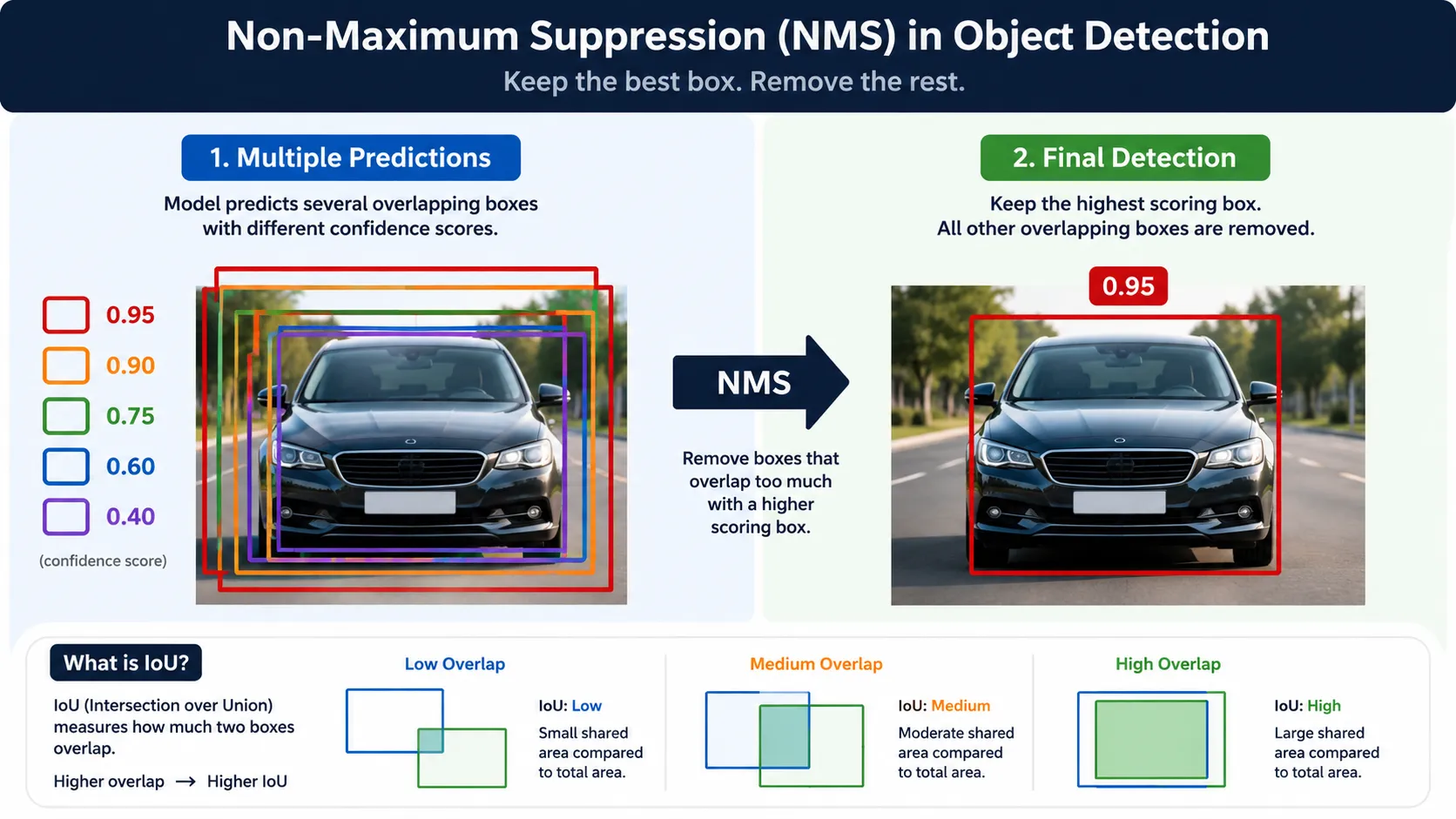
A detector may initially produce several overlapping candidate boxes around the same car.
We usually do not want the final screen to show five boxes around one vehicle.
Many YOLO pipelines solve this using a process called Non-Maximum Suppression, or NMS.
NMS compares overlapping detections and usually keeps the stronger prediction while removing unnecessary duplicates.
To measure how much two boxes overlap, object-detection systems commonly use Intersection over Union, better known as IoU.
You do not need the mathematics yet.
Just imagine two rectangles around the same car.
If they overlap heavily, there is a good chance that both predictions refer to the same object.
The system can use their confidence and overlap to decide which detection should remain.
However, there is an important modern update.
Not every current YOLO model requires traditional NMS. End-to-end models such as YOLOv10 and YOLO26 can produce final detections without the normal NMS post-processing stage.
So NMS is extremely important for understanding YOLO detection pipelines, but it should not be described as a permanent rule for every YOLO architecture.
A Complete Traffic-Camera Example
Now combine everything.
A traffic-camera frame enters the model.
The backbone extracts useful visual features.
The neck combines information from different feature levels so objects of different sizes can be represented effectively.
The detection head turns those features into object and bounding-box predictions.
Weak detections can be filtered using a confidence threshold.
Depending on the YOLO architecture, overlapping predictions may then be cleaned using NMS, or an end-to-end detection head may produce final predictions directly.
The output might finally show:
Car
Bus
Motorcycle
Person
Each object now has its own location in the frame.
At this point, YOLO has answered the two questions we started with:
What is in the image? and Where is it?
But detecting objects in one frame is only half the story.
A real traffic or security system watches hundreds or thousands of frames.
So the next challenge is much more interesting:
How can YOLO learn to recognize these objects in the first place, and how can a system follow the same car or person as they move through a video?
How Does YOLO Learn to Detect Objects?
So far, we have seen what happens when a trained YOLO model receives an image.
But there is an important question:
How does YOLO know what a car, person, bus, or motorcycle looks like?
It learns from examples.
Imagine teaching a child to recognize cars. You would show many different cars — small cars, large cars, cars from the front, cars from the side, cars at night, and cars partly hidden behind other vehicles.
Training an object detection model follows a similar idea, but the computer needs much more structured information.
Training Data and Image Annotation
Before training begins, we need a collection of images known as a dataset.
For a traffic-monitoring project, the dataset might contain thousands of road images showing:
cars,
buses,
trucks,
motorcycles,
bicycles,
and pedestrians.
But simply giving these images to the model is not enough.
We also need to tell the model where each object is located.
This process is called image annotation or data labeling.
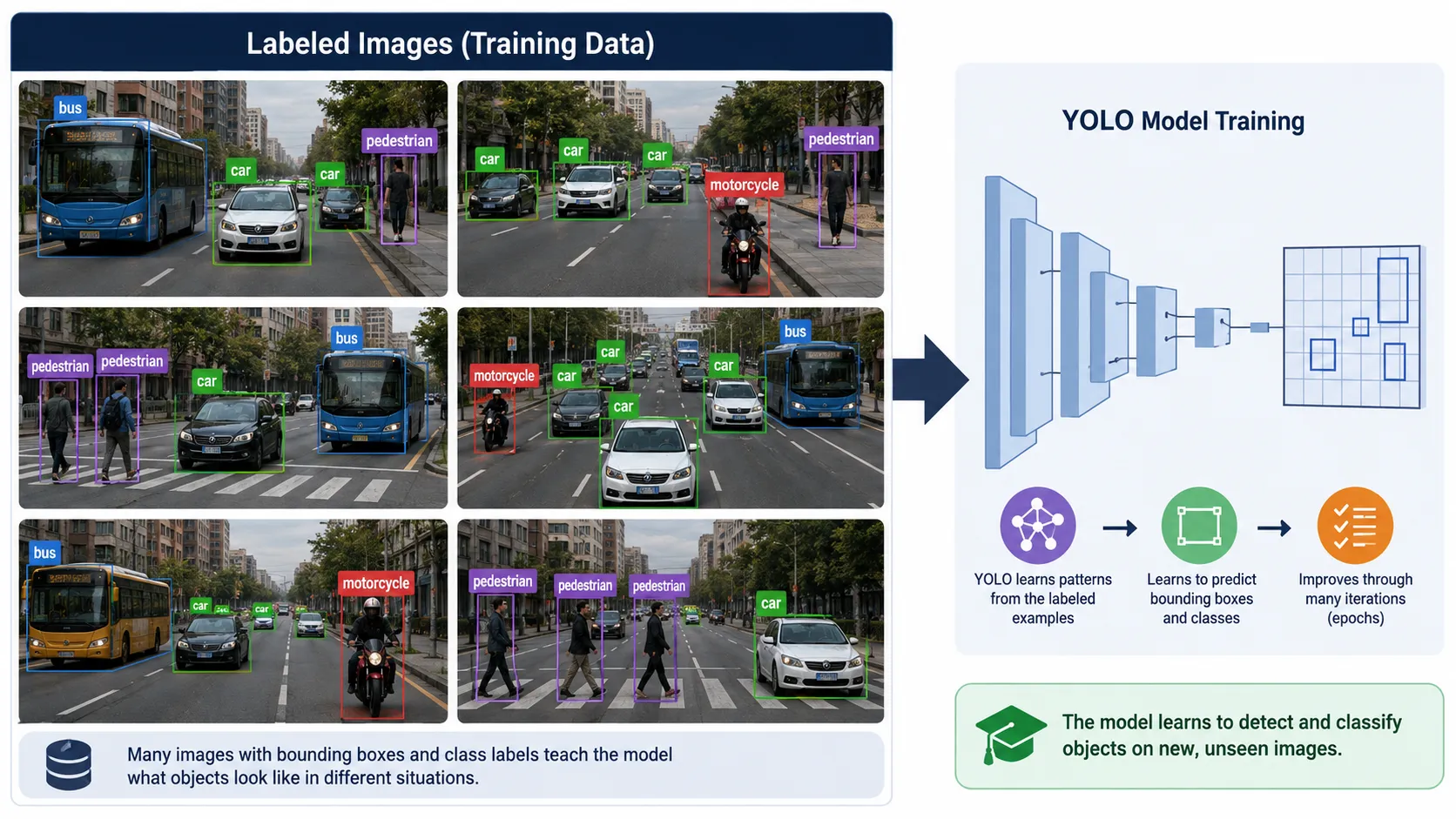
Suppose one training image contains a car and two people.
During annotation, a bounding box is drawn around the car and labeled:
car
Another box is drawn around each person and labeled:
person
YOLO-format detection datasets store information about the object's class and bounding-box position for training. Modern YOLO tools can also train models on custom datasets instead of limiting users to the classes available in general datasets.
This means you could build a specialized model for your own problem.
For example, a highway company might train classes such as:
car,
truck,
bus,
motorcycle,
ambulance,
and construction vehicle.
A factory could train completely different classes, such as:
helmet,
worker,
machine,
box,
and safety vest.
That flexibility is one reason object detection is useful in so many industries.
What Happens During YOLO Training?
During training, YOLO repeatedly looks at labeled images and makes predictions.
At first, those predictions can be poor.
The model might place a bounding box too far to the left.
It might classify a truck as a bus.
It might miss a small motorcycle completely.
The training process compares those predictions with the correct annotations.
The network then adjusts its internal parameters so future predictions become better.
This happens again and again across many training examples.
One complete pass through the training dataset is commonly called an epoch. Training normally uses separate training and validation data so developers can check whether the model is learning useful patterns instead of simply memorizing the training images. Modern YOLO training systems also allow pretrained models to be fine-tuned on custom datasets.
What Is IoU in Object Detection?
Earlier, we mentioned Intersection over Union, or IoU.
Now we can understand why it matters.
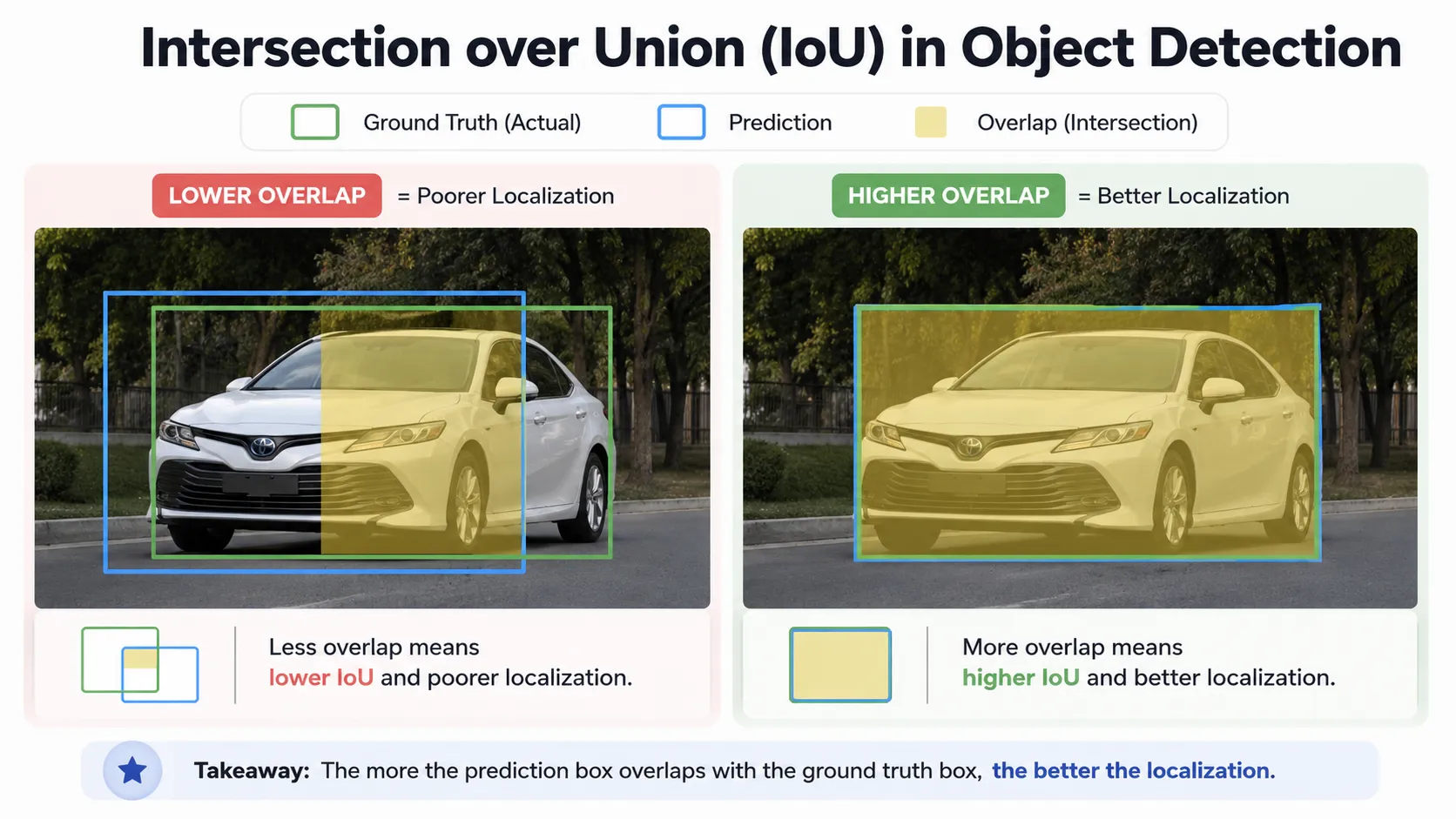
Imagine the correct box around a car is drawn by a human annotator.
YOLO predicts another box around the same car.
If the predicted box closely matches the real box, the overlap will be high.
If the predicted box is far away or badly sized, the overlap will be low.
IoU gives us a way to measure that overlap.
You do not need to remember a complicated formula to understand the idea.
Think of it like this:
Better overlap = better localization.
IoU is widely used when evaluating object-detection results and when deciding whether a predicted box matches a real object.
Detection performance is also commonly evaluated using metrics such as precision, recall, and mAP, or mean Average Precision. Current YOLO validation tools report mAP at different IoU thresholds to help developers understand model quality.
Object Detection vs Object Tracking
This difference is extremely important in real-world video systems.
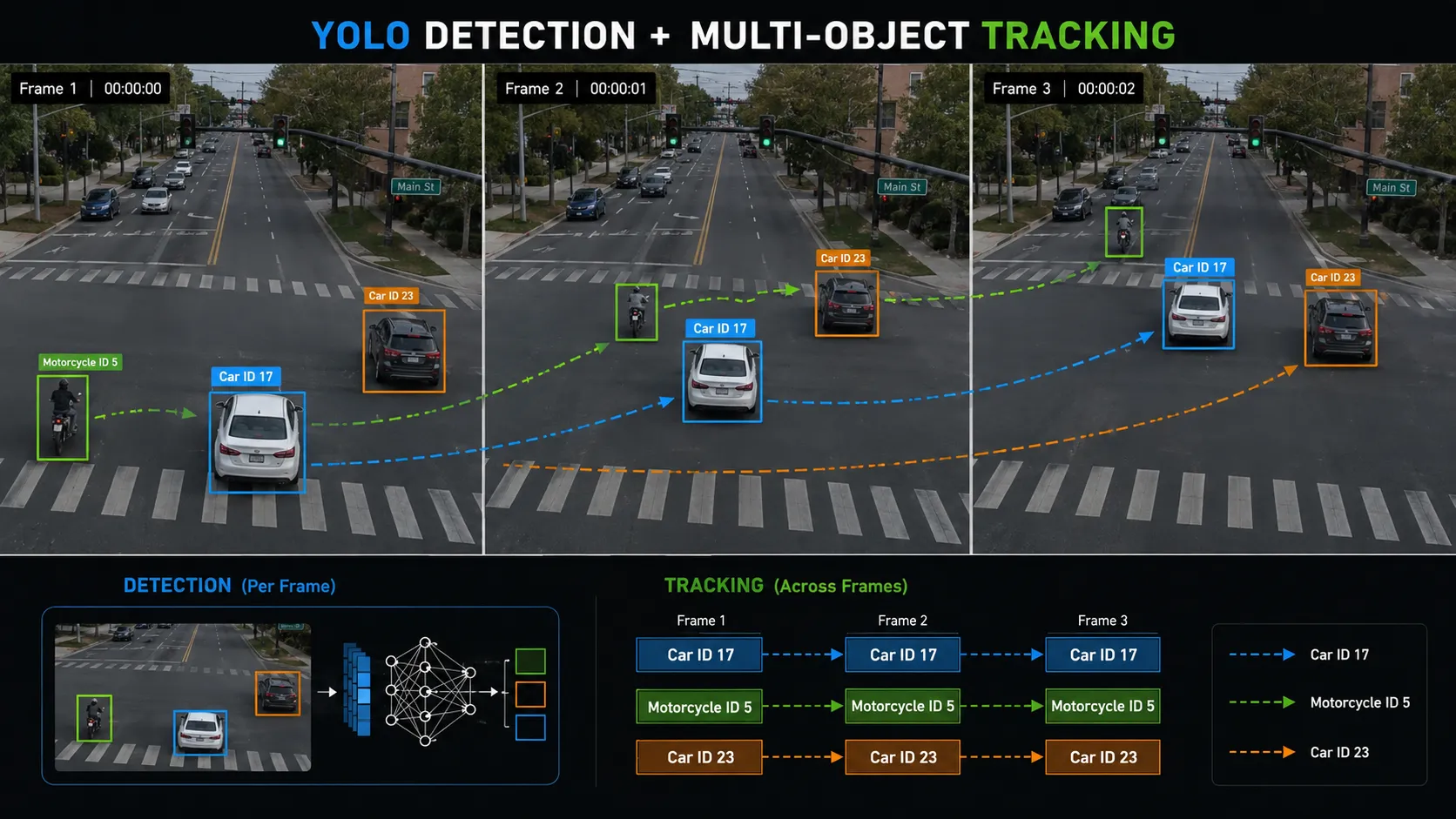
Object detection finds an object in a frame.
Object tracking tries to keep following that object across multiple frames.
Imagine a white car entering a road camera.
In frame one, YOLO detects the car.
In frame two, the car moves slightly forward.
In frame three, it moves closer to the traffic signal.
Detection can find the car in every frame.
Tracking goes one step further and tries to understand:
“This is still the same car.”
A tracker can give the object an ID, such as:
Car ID 17
As the vehicle moves through the video, the system attempts to keep that identity connected to the same vehicle.
Current YOLO tracking workflows can combine object detection with tracking algorithms that associate detections across video frames. This is useful for applications such as surveillance and traffic monitoring.
Real-World Example: Smart Traffic Monitoring
Now imagine YOLO connected to a camera above a busy intersection.
The system detects vehicles in every frame.
Tracking allows it to follow individual vehicles.
Virtual lines or regions can then be added to the video.
When a tracked car crosses a line, the system can increase the vehicle count.
This can help answer questions such as:
How many vehicles entered this road?
How busy is the intersection?
Which direction has the most traffic?
How many motorcycles passed during the last hour?
Are vehicles entering a restricted lane?
Object detection alone provides visual understanding.
Detection combined with tracking and application logic turns that understanding into useful information.
Real-World Example: Security Camera Surveillance
The same idea works for security systems.
Imagine a warehouse with a restricted loading area.
A camera continuously watches the entrance.
YOLO can detect a person entering the frame.
A tracking system can follow that person while they move.
Additional application rules can then decide whether the event needs attention.
For example:
If a person enters a restricted zone after working hours, create an alert.
If someone leaves the area again, update the event.
If the camera detects only an authorized vehicle in another region, no alert may be needed.
This shows an important point:
YOLO is usually one part of a larger intelligent system.
The detector recognizes objects.
Tracking connects them across frames.
Business rules decide what should happen next.
Advantages of YOLO Object Detection
YOLO became popular largely because it made object detection practical for applications where speed matters.
Its unified detection approach was originally designed around real-time prediction, and modern YOLO families continue to focus heavily on efficient computer-vision workflows.
Another advantage is flexibility.
YOLO models can be used with images, recorded videos, and live streams. They can also be trained on custom datasets when a business needs to recognize its own object classes.
But YOLO is not perfect.
Small objects can be harder to detect, especially when they occupy only a tiny part of an image.
Poor lighting, motion blur, unusual camera angles, heavy rain, shadows, and objects blocking each other can also make detection more difficult.
A model trained mainly on clear daytime road images may perform poorly on dark nighttime footage if the training data does not represent those conditions well.
That is why good training data matters so much.
Final Thoughts: Why YOLO Matters
Think again about the traffic camera we started with.
To a normal camera, a road is simply a stream of images.
To an object-detection system, that same scene can become structured information:
a car at this position,
a pedestrian near the crossing,
a motorcycle moving through traffic,
a bus approaching the signal.
YOLO helps turn pixels into those useful detections.
The backbone extracts features.
The neck combines information at different scales.
The detection head produces object predictions.
Bounding boxes show where objects are located.
Confidence scores help filter predictions.
IoU helps measure localization quality.
And tracking can connect the same detected object across multiple video frames.
Once you understand that complete flow, YOLO stops looking like a mysterious AI model.
It becomes something much easier to understand:
a fast computer-vision system trained to answer two simple but powerful questions — what am I looking at, and where is it?
Frequently Asked Questions About YOLO Object Detection
What is YOLO object detection?
YOLO, which stands for You Only Look Once, is a popular approach for finding and locating objects inside images and videos. Instead of only saying that an image contains a car or person, YOLO can also show where that object appears by placing a bounding box around it.
This makes YOLO useful for traffic cameras, security systems, robotics, retail monitoring, and many other computer-vision applications.
How does YOLO detect objects?
YOLO sends an image through a neural network that extracts useful visual features and then predicts the location and class of objects.
In a modern YOLO architecture, you can think of the process as three main stages: the backbone extracts features, the neck combines features at different scales, and the detection head produces the final object predictions.
Why is YOLO fast?
YOLO was designed around the idea of performing object detection through one unified neural-network pipeline instead of repeatedly analyzing different image regions through separate detection stages.
This makes YOLO well suited to applications where speed matters, such as live traffic monitoring, security cameras, robots, and real-time video analysis.
What is a bounding box in YOLO?
A bounding box is the rectangle drawn around a detected object.
For example, if YOLO detects a car in a traffic-camera image, the bounding-box coordinates tell the system where that car begins and ends inside the image.
Along with the box, the detector can also provide the predicted class and a confidence score.
What is a confidence score in YOLO?
A confidence score helps show how strongly the detection system supports a prediction.
For example, YOLO may detect an object as a car with high confidence. Applications can use a confidence threshold to remove weaker predictions that may not be reliable enough.
The best threshold depends on the real-world problem because making it too high can also remove useful detections.
Can YOLO detect multiple objects at the same time?
Yes.
A single image can contain many objects, and YOLO can return multiple detections from that image.
For example, a road camera may detect several cars, motorcycles, buses, and pedestrians in the same frame, with separate bounding boxes and class predictions for each detected object.
Can YOLO be used with CCTV and security cameras?
Yes. YOLO can analyze video frames from security-camera systems and detect objects such as people or vehicles.
The detection system can then be connected with tracking and application rules.
For example, a warehouse system could detect a person entering a restricted area and use additional software logic to create an alert.
What is the difference between YOLO object detection and object tracking?
Object detection tells us what an object is and where it appears in a particular frame.
Object tracking tries to follow the same object across multiple video frames.
For example, YOLO may detect a car in each frame of a road video. A tracking system can assign that vehicle an ID and attempt to keep the same ID as the car moves through the scene.
Can I train YOLO on my own objects?
Yes.
YOLO models can be trained or fine-tuned on a custom dataset.
You first collect images related to your problem and label the objects you want the model to learn.
For example, a factory could create classes for workers, helmets, safety vests, machines, and boxes instead of using only common everyday object classes.
Is YOLO always accurate?
No object-detection model is perfect.
YOLO performance can be affected by small objects, poor lighting, motion blur, unusual viewing angles, crowded scenes, partly hidden objects, or training data that does not represent the real environment properly.
A strong YOLO system therefore depends not only on the model architecture but also on good-quality data, correct annotation, proper training, validation, and testing in real-world conditions.
Do you want to Now how toh work Machine learning (ML) Click me


