


Imagine taking a normal photo from your phone and giving it the colors, brush strokes, and mood of a famous painting.
Your photo may show a quiet street, a mountain, your pet, or even your own desk. But after processing it, the same scene can suddenly look as if it were painted on canvas.
That idea is called neural style transfer.
It is one of the most interesting examples of how deep learning can work with images. Instead of asking a neural network to simply recognize what is inside a picture, neural style transfer uses what the network has learned to separate the content of an image from its visual style.
Then it brings the two back together.
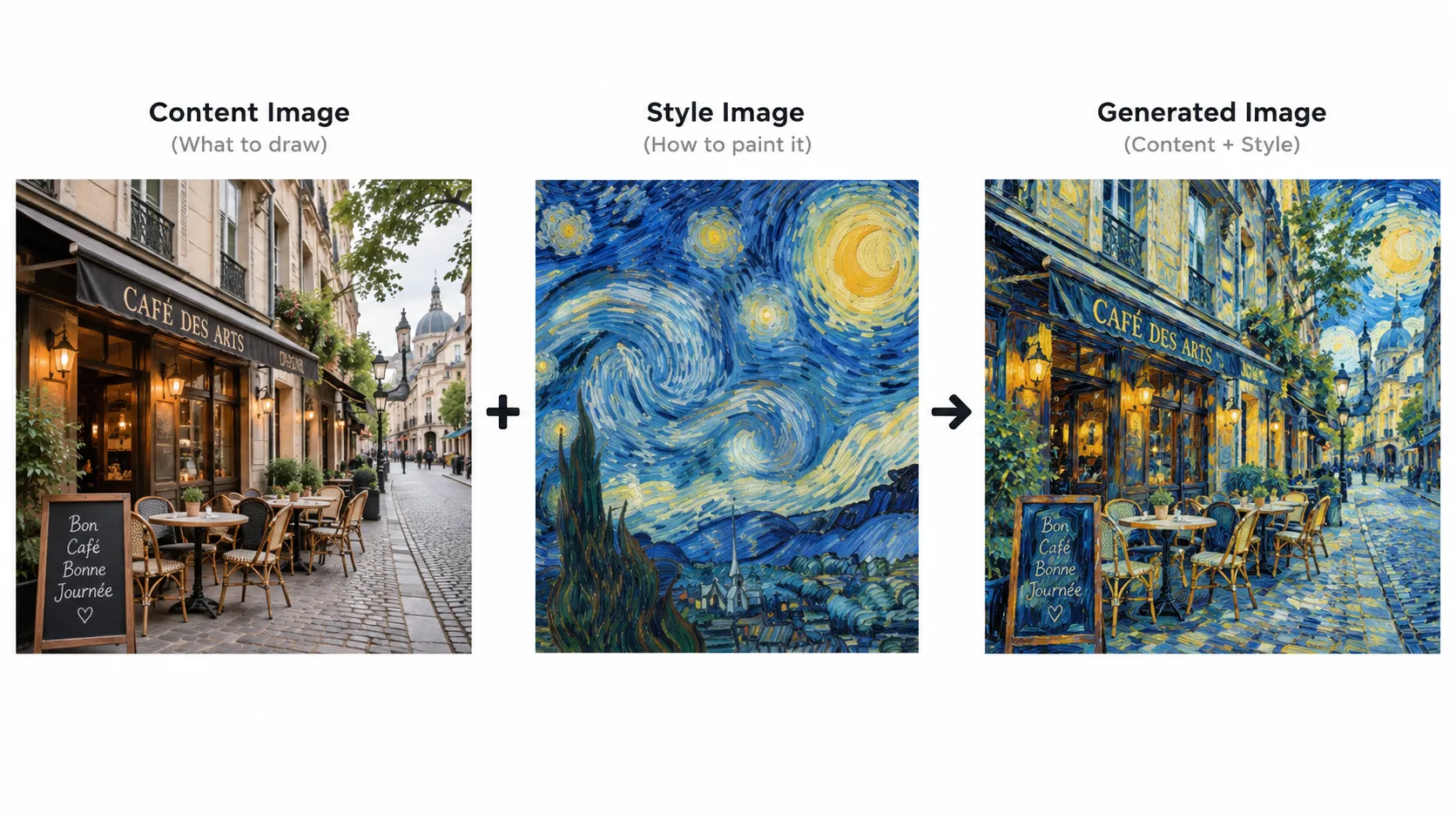
For example, suppose you have a photograph of your city at night and a painting inspired by Vincent van Gogh.
You want to keep the buildings, road, trees, and overall structure of your photograph. At the same time, you want the new image to carry the strong colors, flowing textures, and painted feeling of the artwork.
Neural style transfer tries to create exactly that result.
And the interesting part is that the computer does not simply place one image on top of another.
It uses a convolutional neural network, or CNN, to understand different visual patterns inside both images.
What Is Neural Style Transfer?
Neural style transfer is a deep learning technique that combines the content of one image with the artistic style of another image.
You normally work with three images:
A content image
A style image
A generated image
The content image tells the system what the final picture should contain.
The style image tells it how the final picture should look.
The generated image is the image that slowly changes until it contains a useful balance of both.
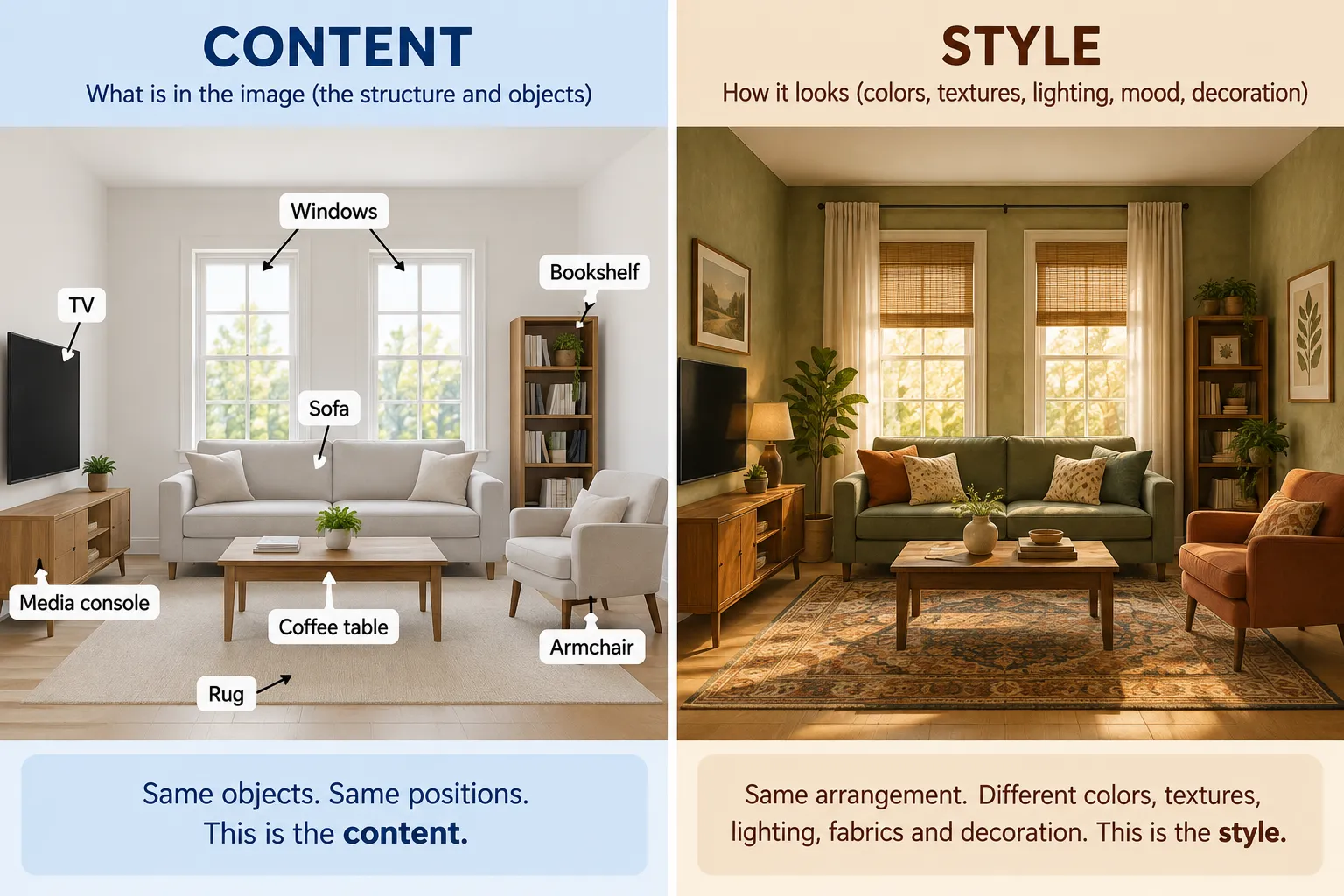
Think about decorating a room.
The walls, windows, doors, sofa, and furniture positions represent the content. They decide the basic structure of the room.
Now imagine changing the colors, textures, lighting, fabrics, and decoration without moving the furniture.
Those visual choices represent the style.
Neural style transfer follows a similar idea with images.
It tries to protect the important structure of one picture while borrowing visual patterns from another.
A Simple Real-Life Example
Suppose you take a photograph of a small café on a rainy evening.
The photograph contains:
the café building,
two tables,
a street lamp,
people walking outside,
and reflections on the wet road.
This becomes your content image.
Now you choose a colorful painting as your style image.
The painting contains thick brush strokes, bright yellows, dark blues, curved patterns, and a rough painted texture.
After neural style transfer, the café should still look like the same café.
The tables should remain in roughly the same place. The street lamp should still be visible. The road should still follow the original photograph.
But its visual appearance changes.
The road might contain painted strokes. The sky might use stronger colors. Light from the café may spread across the scene in an artistic way.
This is why neural style transfer feels different from a basic image filter.
A normal filter may change brightness, contrast, saturation, or color.
Neural style transfer works with features learned by a neural network.
Why Do We Need a CNN?
A computer sees an image as numbers representing pixels.
But simply comparing individual pixels would not be enough.
Imagine moving an object only a few pixels to the right. To us, the picture may still look almost identical. A direct pixel comparison, however, can detect many differences.
A CNN gives us a much more useful way to study an image.
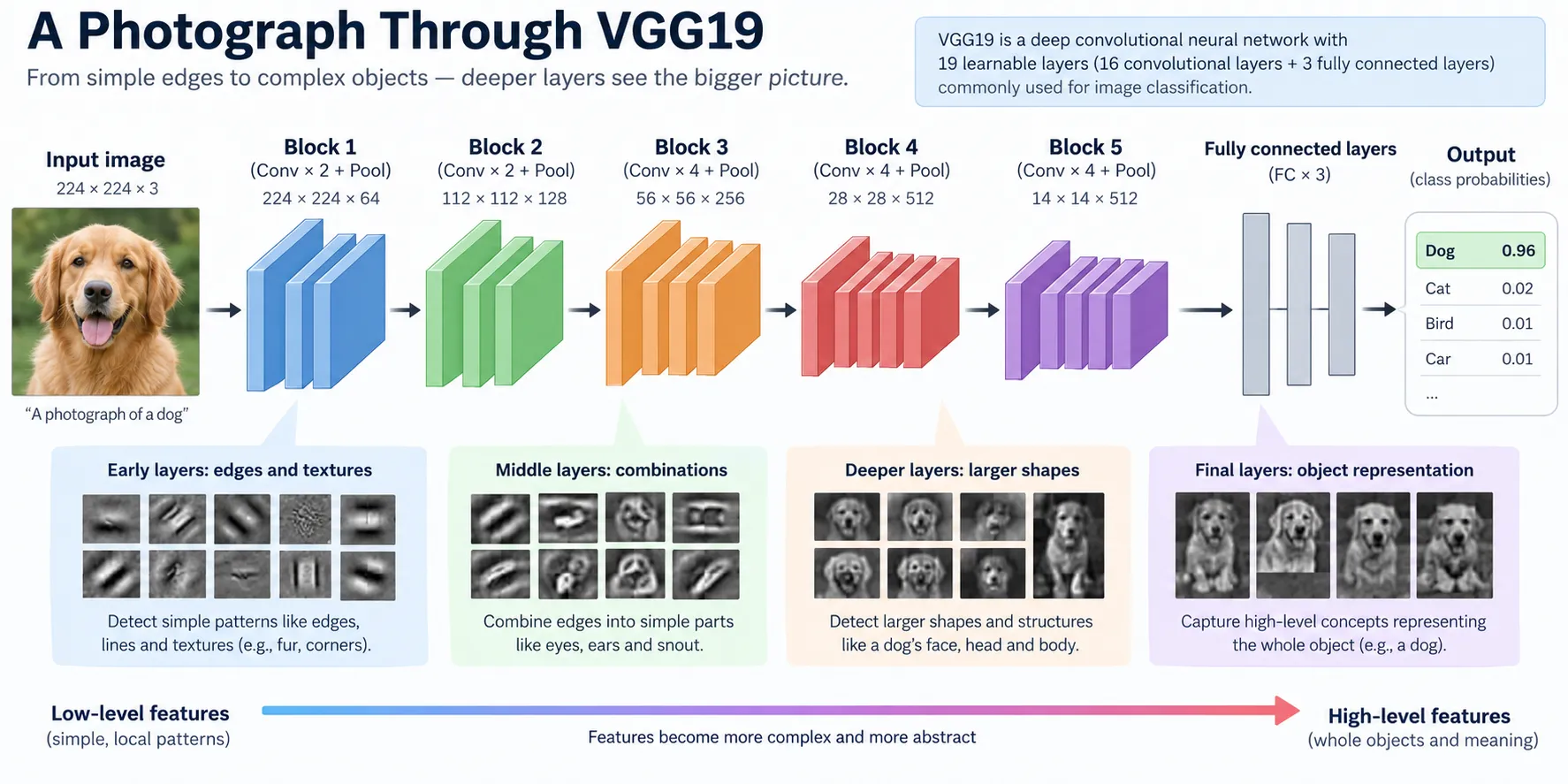
As an image passes through the convolutional layers of a CNN, the network builds different types of feature representations.
Earlier layers can respond strongly to simple visual patterns such as:
edges,
lines,
colors,
small textures,
and basic shapes.
Deeper layers can represent more meaningful structures and combinations of features.
This layered understanding is extremely useful for neural style transfer.
Instead of asking:
“Does every pixel match?”
we can ask:
“Do these images contain similar visual features?”
That small change in thinking makes the whole technique possible.
Why Is VGG19 Used in Neural Style Transfer?
One of the most common models used to explain classic neural style transfer is VGG19.
VGG19 is a convolutional neural network that was originally trained for image recognition.
For neural style transfer, we are not mainly interested in using its final classification answer.
Instead, we use the intermediate convolutional layers.
These layers give us feature maps that describe different visual information inside an image.
In a classic setup, the pretrained VGG19 model is kept fixed. We are not teaching VGG19 a completely new task.
Instead, we use the visual knowledge already stored in the network to measure how close our generated image is to the content image and the style image.
The Three Images You Need
Before going deeper into the mathematics, it helps to clearly understand the role of each image.
1. Content Image
The content image contains the scene or object you want to preserve.
It could be:
a portrait,
a landscape,
a building,
a pet,
a city street,
or almost any photograph.
Its main job is to tell the algorithm:
“Keep this basic structure.”
2. Style Image
The style image provides the artistic appearance.
It may contain:
unusual colors,
visible brush strokes,
repeated textures,
curved patterns,
sharp geometric shapes,
or another strong visual style.
Its job is to tell the algorithm:
“Make the new image feel visually similar to this.”
3. Generated Image
The generated image is the picture that the algorithm changes during the optimization process.
At the beginning, it can start from the content image or another initial image.
The algorithm then makes many small changes to it.
After each change, it checks two important questions:
Does the generated image still represent the original content?
And:
Does it look more like the selected artistic style?
These two questions lead us to the most important ideas behind neural style transfer: content loss and style loss.
They are the signals that guide the generated image toward the final result.
What Is Content Loss in Neural Style Transfer?
We already know that the final image should keep the basic structure of the original photo.
But how does the computer know whether that structure is still there?
This is where content loss comes in.
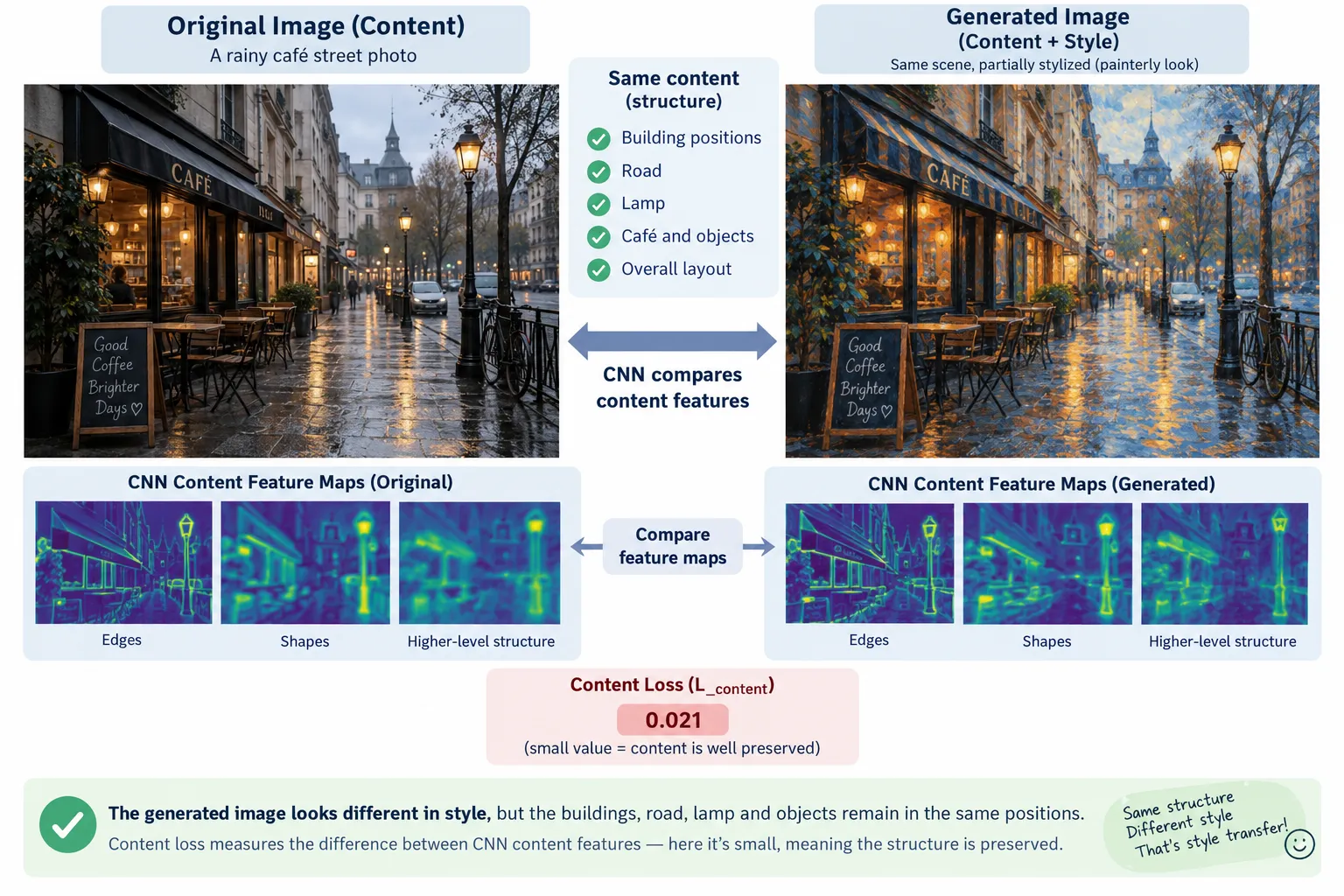
Content loss measures how different the generated image is from the original content image at the feature level.
Remember, we are not comparing the two images pixel by pixel.
Instead, both images are passed through the pretrained VGG19 network. We then look at the feature maps produced by a selected convolutional layer.
If the feature representation of the generated image is close to the feature representation of the original photo, the content loss stays low.
If they become very different, the content loss increases.
Think about our café example.
The original photograph contains a café, a street lamp, tables, people, and a wet road.
Even after adding a painted style, we still want those important shapes and objects to remain recognizable.
Content loss acts like a guard saying:
“You can change the artistic appearance, but do not forget what this image is actually showing.”
A Simple Way to Understand Content Loss
Imagine you ask two artists to draw the same house.
One artist uses a pencil.
The other uses watercolor.
The colors and textures may be completely different, but both drawings can still show the same house.
That shared structure is similar to what content features represent.
In neural style transfer, the generated image does not need to match every original pixel. It simply needs to preserve enough important visual features to maintain the content.
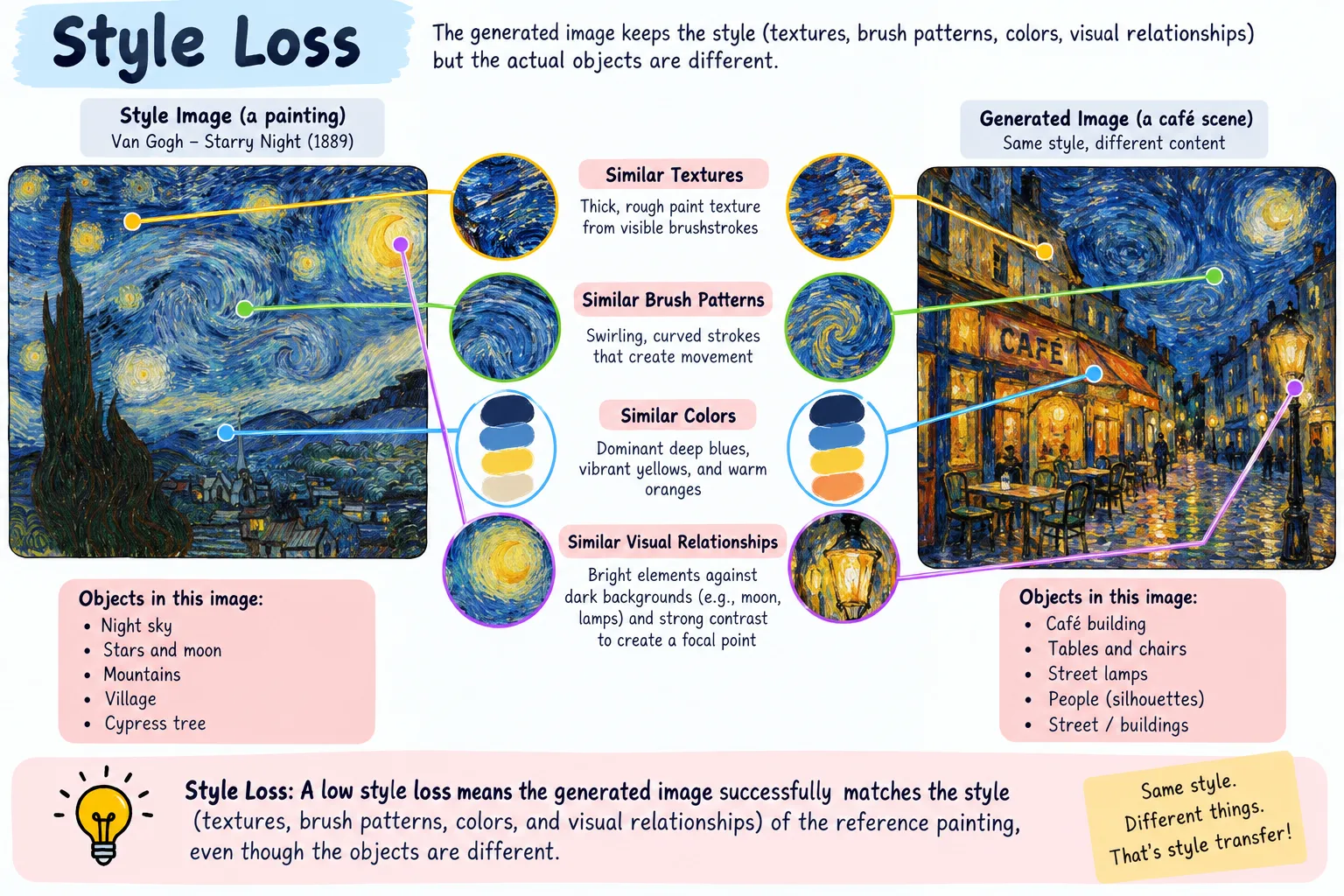
What Is Style Loss?
Now we have another problem.
Keeping the café structure is not enough.
We also want the generated picture to look like our chosen painting.
That job belongs to style loss.
Style loss measures how different the visual patterns of the generated image are from those of the style image.
Here we care less about exact objects and more about things such as:
textures,
repeated patterns,
color relationships,
brush-like structures,
and the way different visual features appear together.
Suppose our style image contains strong blue curves and bright yellow painted patterns.
The generated image does not have to copy the objects from that painting.
If the painting contains a tree, we do not necessarily want that tree to suddenly appear in our café photograph.
We want its artistic characteristics, not its exact scene.
This distinction is extremely important.
What Is a Gram Matrix?
To understand style loss properly, we need to meet one of the most famous ideas used in classic neural style transfer: the Gram matrix.
The name sounds mathematical, but the basic idea is easier than it first appears.
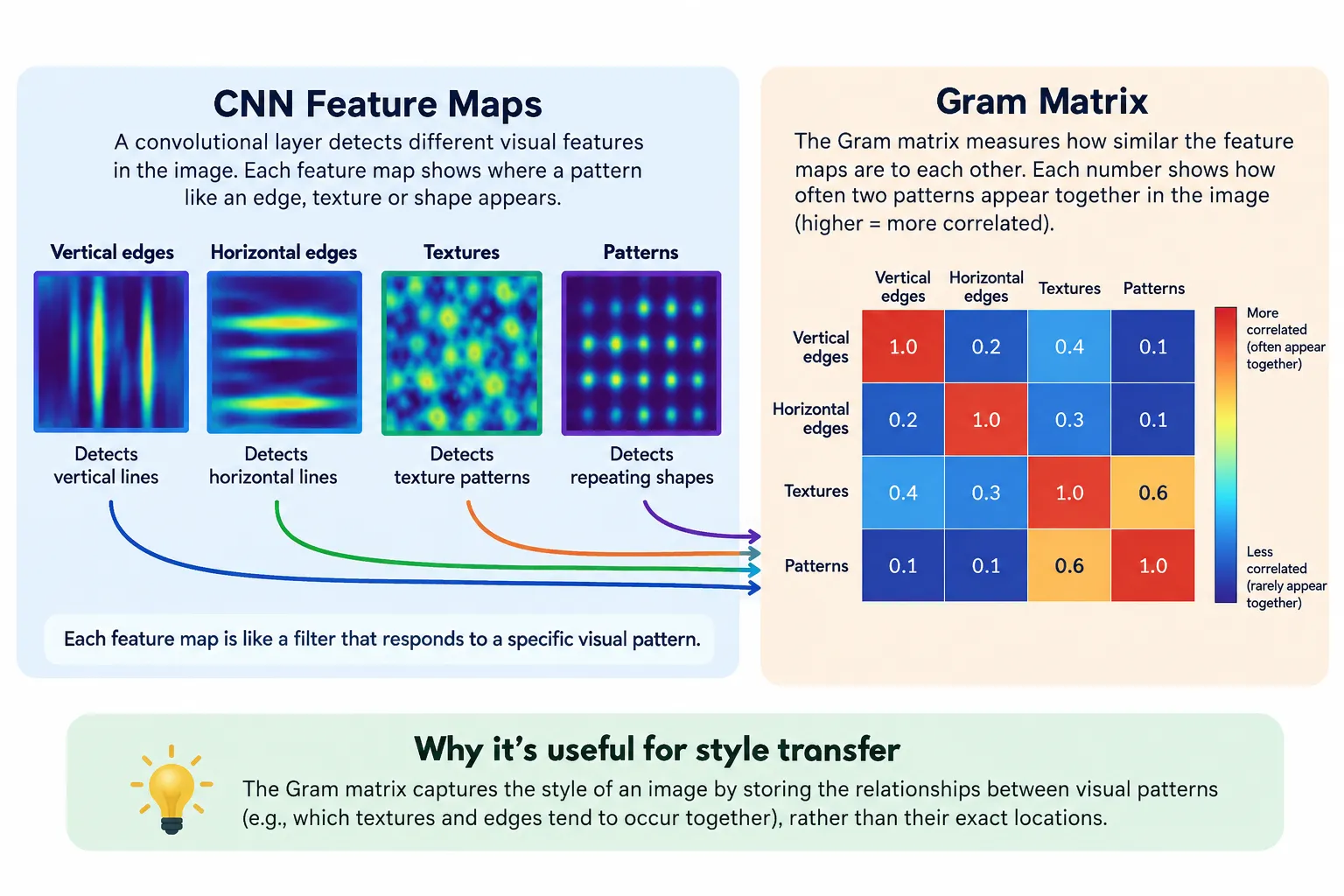
When an image passes through a CNN layer, that layer produces several feature maps.
Different feature maps may react to different visual patterns.
One may react strongly to certain edges.
Another may respond to textures.
Another may become active around particular shapes or color patterns.
A Gram matrix helps us measure how these feature maps relate to each other.
Instead of asking exactly where a feature appeared, it captures relationships between feature activations.
That makes it useful for representing visual style.
Think of It Like Music
Imagine listening to two songs.
You may not care whether the same note appears at exactly the same second.
Instead, you may notice that both songs use similar combinations of drums, guitar, bass, and rhythm.
That relationship between different sounds creates part of the musical feeling.
A Gram matrix does something loosely similar for CNN features.
It captures which visual features tend to appear strongly together.
So if the generated image has feature relationships similar to the style image, its Gram matrices also become more similar.
That means the style loss becomes smaller.
Content Loss vs Style Loss
At this point, neural style transfer becomes much easier to understand.
Content loss asks:
“Does the generated image still contain the important structure of the original photograph?”
Style loss asks:
“Does the generated image have visual feature patterns similar to the artwork?”
The algorithm needs both.
If we cared only about content loss, the generated picture could stay almost identical to the original photo.
There would be very little artistic transformation.
If we cared only about style loss, the algorithm could focus too strongly on matching textures and patterns from the artwork, making the original scene difficult to recognize.
The real goal is balance.
Understanding Total Loss
Neural style transfer combines these goals into an overall objective often called total loss.
In simple form, you can think of it as:
Total Loss = Content Contribution + Style Contribution
But we can control how strongly each side matters.
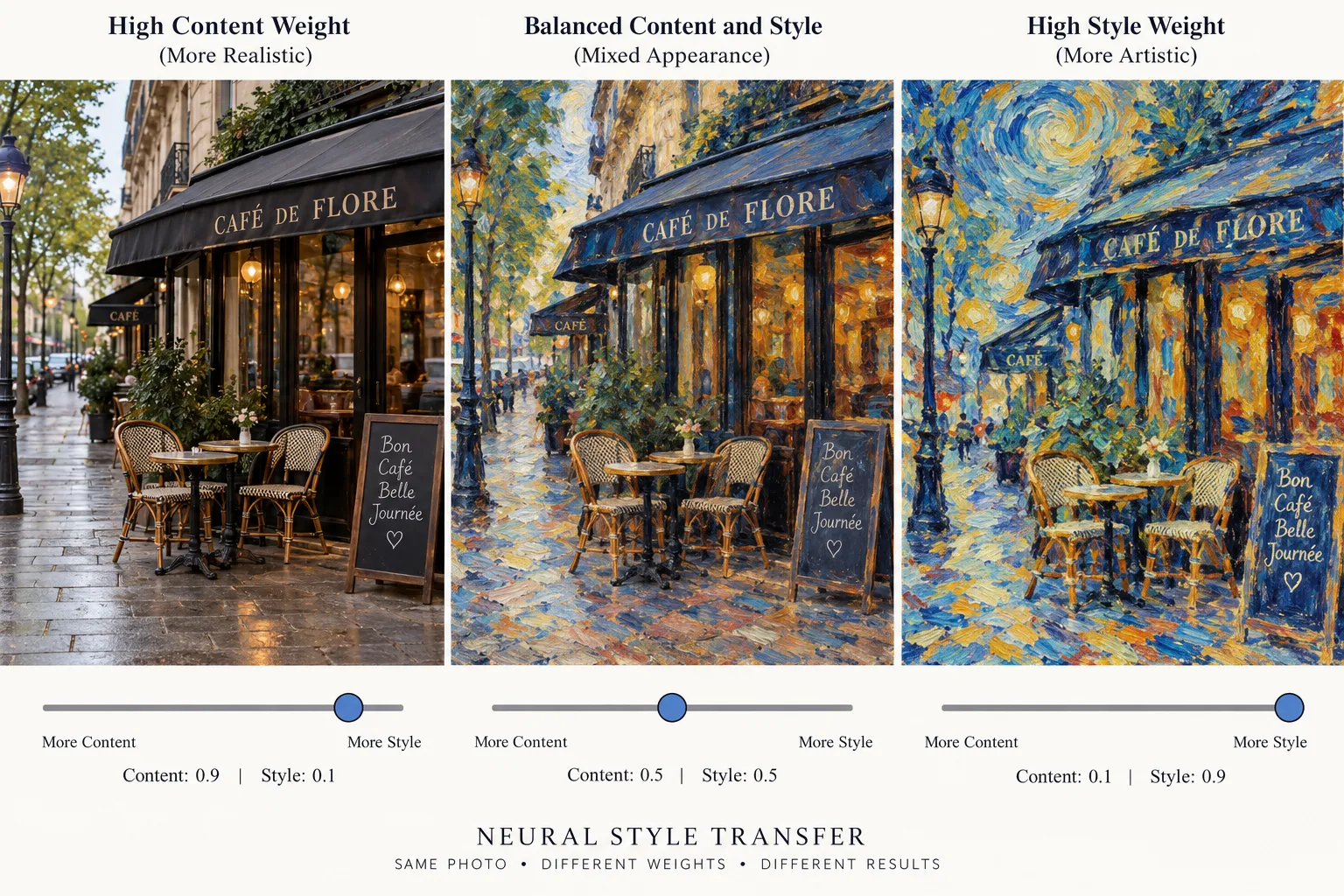
You will often see two weights used for this purpose:
Content weight controls how strongly the original scene should be protected.
Style weight controls how strongly the artistic appearance should influence the generated image.
Imagine a slider.
Move it toward content, and the final result stays closer to the photograph.
Move it toward style, and the painting has a stronger visual effect.
There is no single perfect balance for every image.
Different combinations can create very different results.
A portrait may need stronger content preservation so that the person's face remains recognizable.
A landscape may work well with stronger stylization because changing textures in the sky, grass, or mountains can create an interesting result.
How Does Neural Style Transfer Actually Create the New Image?
Here is the clever part.
In classic neural style transfer, we are usually not retraining VGG19 during this process.
The pretrained network is mainly used as a feature extractor.
Instead, we optimize the generated image itself.
Imagine starting with a copy of our café photograph.
We send it through VGG19 and calculate:
its content loss,
its style loss,
and therefore its total loss.
The algorithm then asks:
“What small change can I make to the generated image that will reduce this loss?”
The pixels are adjusted slightly.
Then the image goes through the network again.
Loss is calculated again.
The pixels are adjusted again.
This happens repeatedly.
The Optimization Loop
In beginner-friendly terms, the process looks like this:
Step 1: Load the content photograph.
Step 2: Load the style artwork.
Step 3: Create the starting generated image.
Step 4: Pass the images through the pretrained CNN.
Step 5: Measure content loss.
Step 6: Measure style loss using Gram matrices.
Step 7: Combine them into total loss.
Step 8: Update the generated image to reduce that loss.
Step 9: Repeat the process many times.
Little by little, the generated image moves toward a compromise.
It keeps enough information from the original photograph while gradually taking on the artistic patterns of the style image.
Our Van Gogh-Style Café Example
Return to the rainy café photograph.
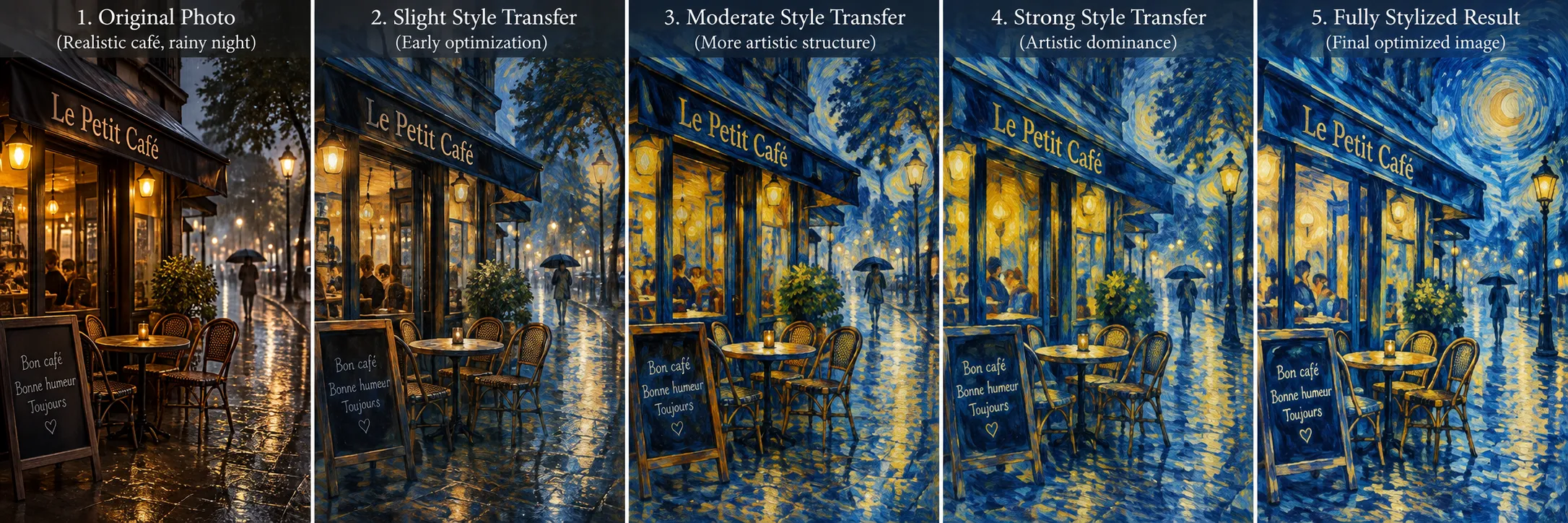
At the start, our generated image may look almost exactly like the original photo.
After several optimization steps, small texture changes begin to appear.
Later, the road may develop flowing patterns.
The dark sky may become richer.
Yellow lights from the café may become stronger and more expressive.
After further optimization, the image can look much more like a painting while the café itself is still recognizable.
And that explains the real idea behind how neural style transfer works.
It is not simply copying a painting onto a photograph.
The algorithm repeatedly compares content features and style features, measures how far the generated image is from its two goals, and changes the image to reduce that difference.
Once you understand content loss, style loss, Gram matrices, and optimization, the technique stops feeling like magic.
The next question is practical:
How can we actually build this process step by step using VGG19 and Python?
How to Build Neural Style Transfer with VGG19
Now that we understand the idea behind content loss, style loss, and optimization, we can look at how the complete process is built in practice.
You do not need to be an advanced programmer to understand this workflow.
The important thing is to know what each step is doing and why it is needed.
For a classic neural style transfer using VGG19, we normally use Python with a deep learning library such as PyTorch.
The full process can be divided into a few simple stages.
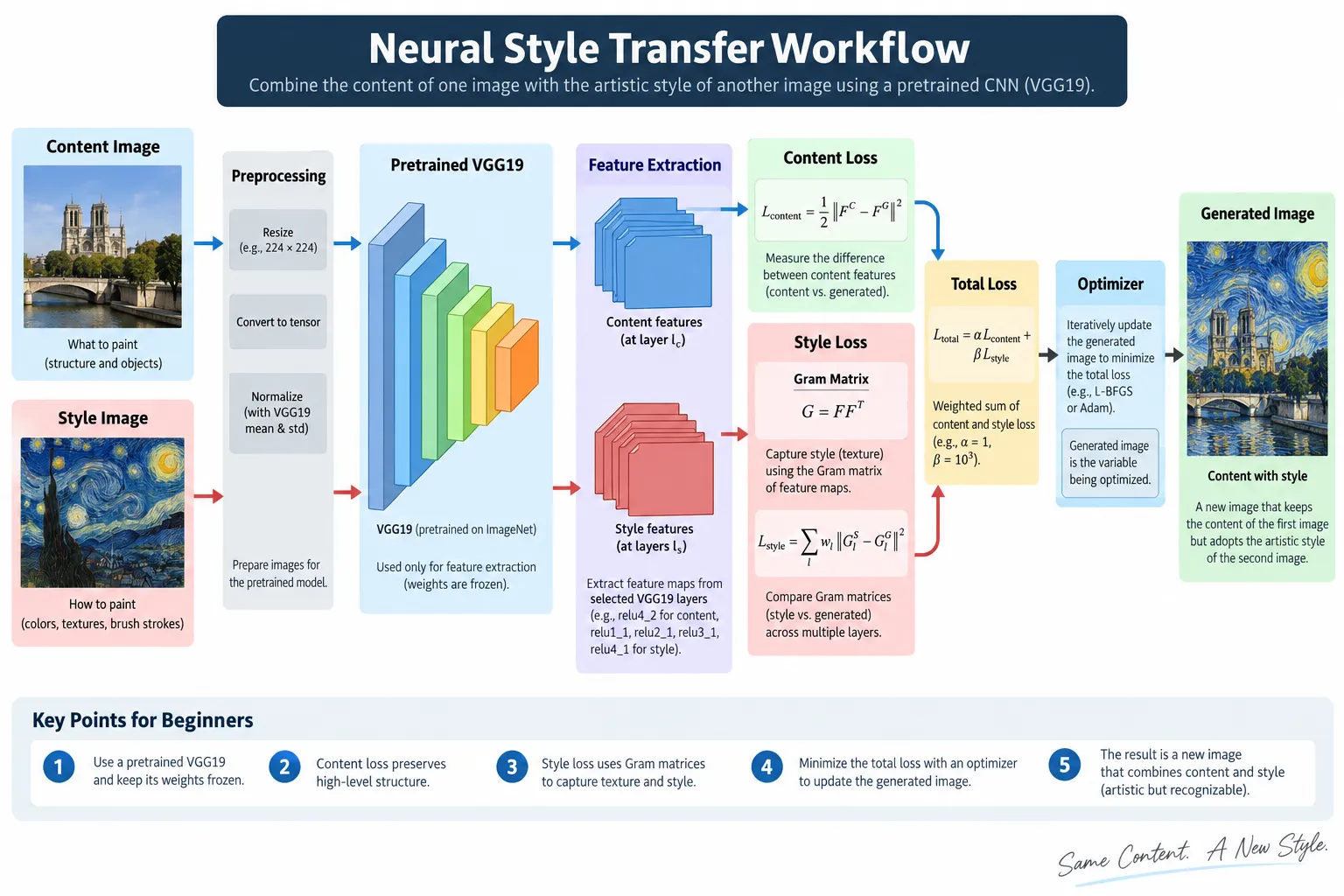
Step 1: Choose the Content and Style Images
First, we need two images.
The content image is the photograph whose structure we want to keep.
The style image is the artwork whose visual appearance we want to borrow.
For our running example, imagine this setup:
Content image: a photograph of a café on a rainy street.
Style image: a Van Gogh-inspired painting with strong blue and yellow brush strokes.
Choosing suitable images matters more than many beginners expect.
If both images have very different sizes, shapes, or visual complexity, the final result may not look balanced.
It is usually helpful to resize them to similar dimensions before starting the style transfer process.
Step 2: Prepare the Images for VGG19
A neural network cannot directly work with an image in the same way we look at it.
The image needs to be converted into numerical data that the model understands.
This usually involves:
resizing the image,
converting it into a tensor,
arranging the color channels correctly,
and normalizing the pixel values.
Normalization is especially important because VGG19 was trained using images prepared in a particular way.
If we give the network completely different input values, its feature representations may not behave as expected.
Think of this like speaking to someone in the format they already understand.
You may have the right information, but you still need to present it correctly.
Step 3: Load a Pretrained VGG19 Model
Next, we load a pretrained VGG19 CNN.
Pretrained means the model has already learned useful visual features from a large collection of images.
We do not need to train it from the beginning.
That would require far more data, computing power, and time.
Instead, we use VGG19 as a feature extractor.
Its convolutional layers already know how to respond to visual patterns such as edges, textures, shapes, and more complex image structures.
For classic neural style transfer, the model's parameters are normally kept fixed.
We are not trying to teach VGG19 new weights.
We are using what it already knows.
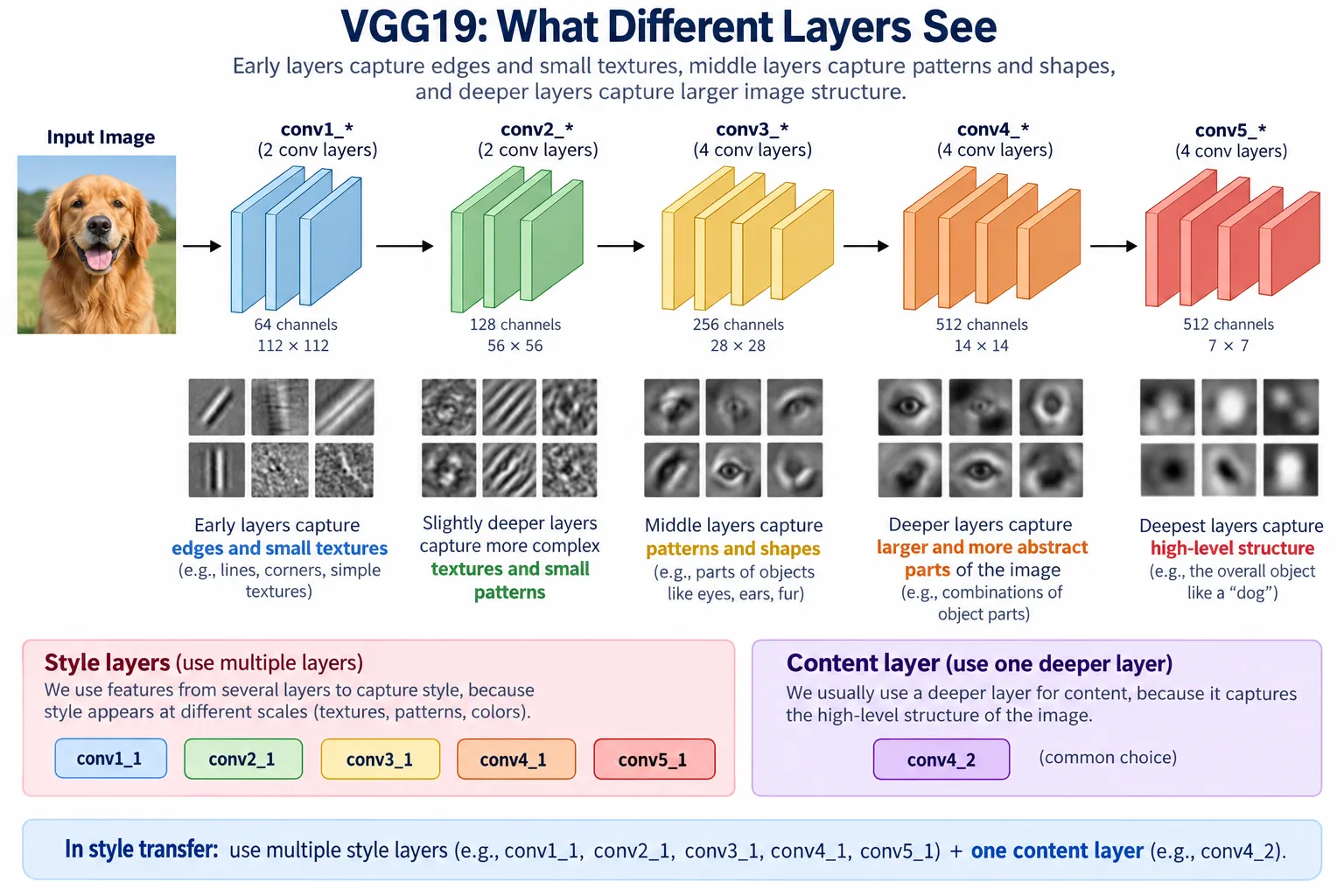
Step 4: Select Content and Style Layers
Not every CNN layer represents an image in exactly the same way.
Earlier layers tend to capture simpler patterns such as edges and textures.
Deeper layers can capture more complex structure.
Because of this, neural style transfer normally uses different layers for content and style information.
A deeper layer can be useful for representing content because it contains more meaningful structural information.
Style can be collected from several layers because artistic appearance can exist at different visual levels.
For example, one layer may capture tiny textures while another captures larger repeating patterns.
Using multiple layers allows the system to understand style more broadly.
Step 5: Extract the Target Features
Now we pass the original content image through VGG19.
We save the features produced by the selected content layer.
These become our content target.
Then we pass the style image through the network.
For the chosen style layers, we calculate their Gram matrices.
These become our style targets.
The word "target" is useful here.
We are basically telling the generated image:
“This is the content representation you should stay close to.”
And:
“These are the style patterns you should move toward.”
Step 6: Create the Generated Image
We now need an image that can actually change.
One common approach is to begin with a copy of the content image.
This gives the optimization process a strong starting structure.
Another approach is to begin with random noise.
However, starting from the content image often makes the process easier to understand and can help preserve the original scene.
The generated image is the only thing we want to update during optimization.
VGG19 stays fixed.
The content target stays fixed.
The style target stays fixed.
Only the generated image changes.
This is one of the most important points to remember about classic neural style transfer.
Step 7: Calculate the Loss
The generated image is passed through VGG19.
We then compare its features with our stored targets.
First, we calculate content loss.
If the generated content representation becomes too different from the original photograph, the content loss increases.
Next, we calculate style loss.
For this, Gram matrices from the generated image are compared with the Gram matrices from the style image.
If the style patterns are very different, style loss increases.
The two losses are then combined using the chosen content and style weights.
The result is the total loss.
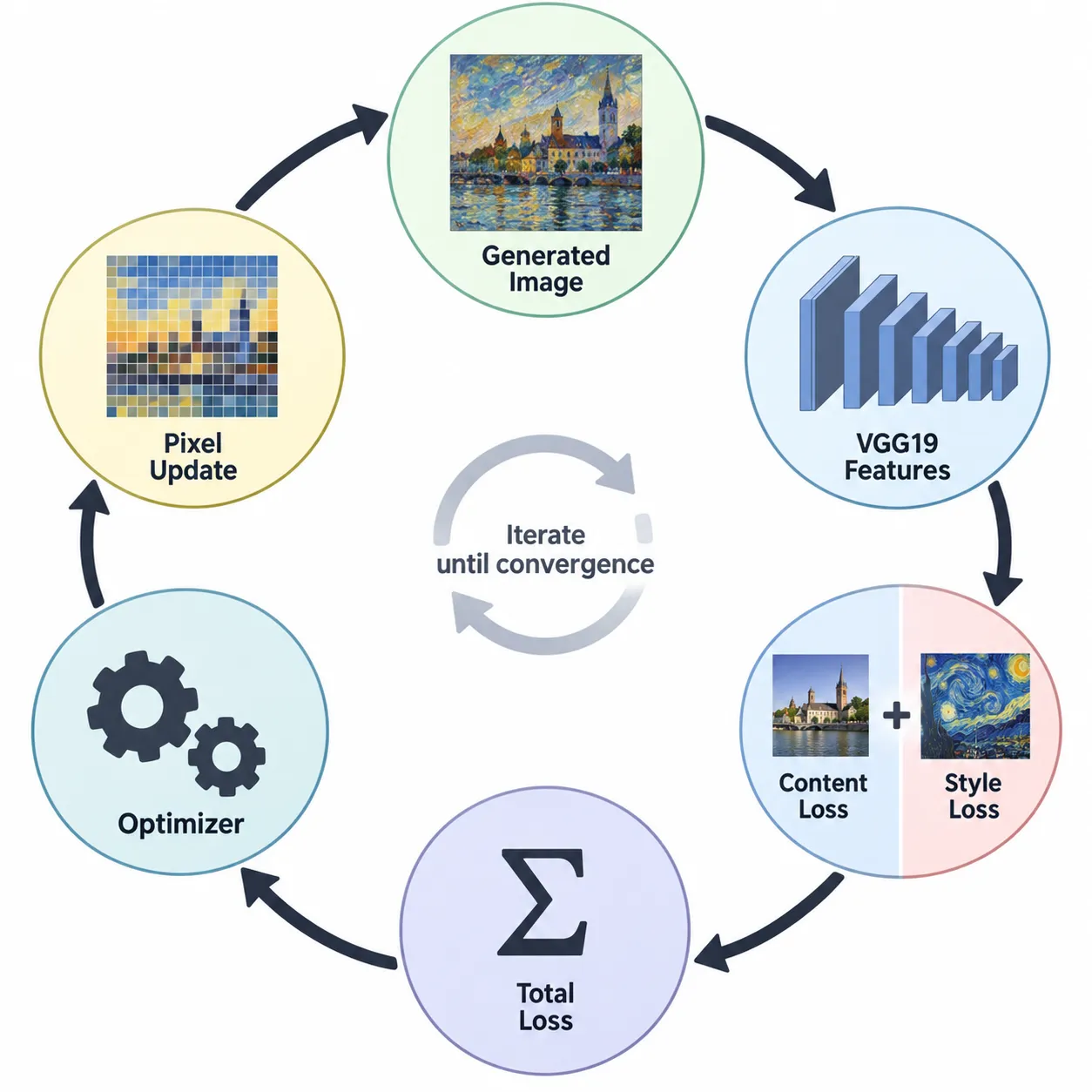
Step 8: Update the Generated Image
Now an optimizer tries to reduce that total loss.
It calculates how the generated image should change and makes small adjustments to its pixel values.
Then everything is checked again.
The new generated image passes through VGG19.
Content loss is recalculated.
Style loss is recalculated.
Total loss is recalculated.
Another update is made.
This cycle continues repeatedly.
Step 9: Watch the Image Improve
This is where the process becomes visually interesting.
Imagine checking the result at different stages.
At the beginning, the image still looks mostly like the original café photograph.
After more optimization steps, colors from the style image begin appearing.
The road may develop painted textures.
The lights may look stronger.
The sky may become more expressive.
Later, larger artistic patterns begin spreading across the photograph.
Eventually, you reach a point where the style is clearly visible without completely destroying the original content.
That is usually the result we are looking for.
More optimization does not always mean a better image.
If the style becomes too strong, important content details may disappear.
If the content is weighted too heavily, the result may look almost unchanged.
Finding the right balance is part of the creative process.
Why Different Results Can Look So Different
Two people can use the same neural style transfer technique and still produce completely different results.
That happens because several choices affect the output:
the content image,
the style image,
the selected CNN layers,
the content weight,
the style weight,
the image size,
the optimizer,
and the number of optimization steps.
This means neural style transfer is not simply an on-or-off effect.
It gives you control over how much artistic transformation you want.
A small style influence can create a subtle painted texture.
A strong style influence can completely change the mood of the image.
Where Is Neural Style Transfer Used?
Neural style transfer is not limited to turning photographs into famous-looking paintings.
The same basic idea has inspired many creative applications.
Digital Art
Artists can experiment with new combinations of photography and painting styles without manually recreating every texture.
Photo Editing
A normal photograph can be given a watercolor, sketch, oil-painting, or abstract appearance.
Social Media Content
Stylized images can be used for profile pictures, campaign visuals, thumbnails, and creative posts.
Game and Film Concepts
Designers can experiment with different visual moods for environments and scenes before creating final artwork.
Learning Deep Learning
Neural style transfer is also a powerful educational example because it shows that CNNs can do much more than classification.
They can also provide useful feature representations for creative image generation.
Neural Style Transfer Is More Than a Photo Filter
The biggest lesson is that neural style transfer is not simply applying colors over a photograph.
A CNN first gives us a way to describe visual content and artistic style.
Content loss helps preserve the scene.
Style loss helps reproduce visual patterns.
Gram matrices describe relationships between style features.
Optimization gradually changes the generated image until those goals reach a useful balance.
That is why a normal photograph can slowly transform into something that feels painted while still remaining recognizable.
Once you understand this workflow, neural style transfer no longer looks like a mysterious AI trick.
It becomes a clear deep learning process built from feature extraction, loss calculation, and repeated optimization.
Frequently Asked Questions About Neural Style Transfer
What is neural style transfer?
Neural style transfer is a deep learning technique that combines the content of one image with the artistic style of another image. For example, you can keep the buildings and road from a normal city photo while giving the image the colors, textures, and brush-stroke feeling of a painting.
How does neural style transfer work?
Neural style transfer uses a pretrained convolutional neural network such as VGG19 to extract visual features from a content image and a style image. It then creates a generated image and repeatedly changes its pixels to reduce content loss and style loss. The final result keeps important parts of the original scene while adopting visual patterns from the style image.
Why is VGG19 used for neural style transfer?
VGG19 is commonly used because its convolutional layers produce useful feature representations at different levels. Earlier layers can capture simple textures and edges, while deeper layers can represent more complex structures. In classic neural style transfer, VGG19 is normally used as a fixed feature extractor rather than being trained again.
What is content loss in neural style transfer?
Content loss measures how different the important visual features of the generated image are from those of the original content image. A lower content loss usually means the generated image is doing a better job of preserving the structure and objects from the original photo.
What is style loss?
Style loss measures how different the visual patterns of the generated image are from those of the style image. It helps the generated image learn things such as textures, color relationships, repeated patterns, and artistic appearance.
What is a Gram matrix in neural style transfer?
A Gram matrix represents relationships between feature maps produced by a CNN layer. In neural style transfer, these relationships help describe the overall visual style of an image. Comparing Gram matrices from the style image and generated image gives the algorithm a way to measure style loss.
Can neural style transfer turn any photo into a painting?
It can stylize many types of photographs, including portraits, landscapes, buildings, pets, and street scenes. However, the quality of the result depends on the content image, style image, selected layers, loss weights, image size, and optimization settings.
Is neural style transfer the same as an image filter?
No. A normal image filter usually changes properties such as brightness, contrast, colors, or saturation using fixed rules. Neural style transfer uses features learned by a neural network to combine the structure of one image with the visual patterns of another.
Does neural style transfer train a new neural network every time?
In the classic optimization-based method, a pretrained network such as VGG19 usually remains fixed. The generated image itself is optimized. Other faster style-transfer methods can train separate neural networks to produce stylized images more quickly.
Why does neural style transfer take time?
Classic neural style transfer repeatedly passes the generated image through the CNN, calculates losses, and updates the image. This optimization may happen many times before a good balance between content and style is reached.
What happens if the style weight is too high?
If the style weight is too high, the generated image may strongly follow the textures and patterns of the style image. This can make important objects or structures from the original photograph difficult to recognize.
What happens if the content weight is too high?
If the content weight is too high, the generated image may remain very close to the original photograph. The artistic style may become weak or barely visible.
Is neural style transfer useful for beginners learning deep learning?
Yes. Neural style transfer is a useful learning project because it connects several important deep learning ideas, including convolutional neural networks, feature maps, pretrained models, loss functions, optimization, and image processing. It also gives learners a visual result that makes these concepts easier to understand.
Final Thoughts
Neural style transfer shows that deep learning can do much more than identify objects in an image.
By using features from a pretrained CNN, we can separate useful information about what an image contains from information about how an image looks.
The content image provides the structure.
The style image provides the artistic appearance.
VGG19 helps extract the visual features.
Content loss protects the original scene, while style loss and Gram matrices guide the artistic transformation.
Optimization then brings everything together by gradually changing the generated image.
The result is a powerful example of how mathematics, computer vision, and creativity can work together.
And once you understand the process step by step, turning an ordinary photograph into an artistic image no longer feels like magic. It becomes a deep learning workflow that you can understand, experiment with, and eventually build yourself.


